
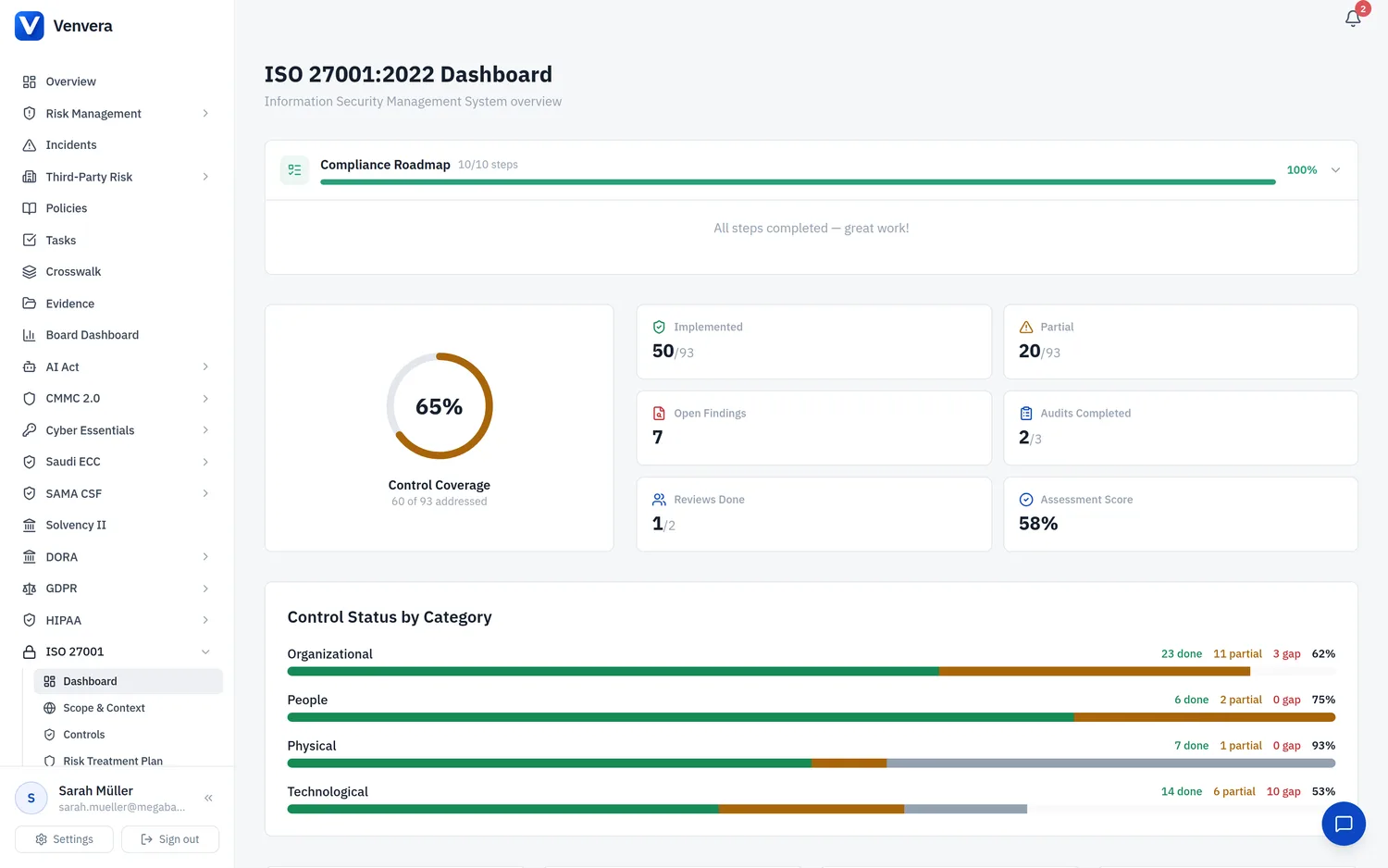
The Statement of Applicability (SoA) is one of the most critical documents in an ISO 27001 ISMS. Required by Clause 6.1.3(d), the SoA lists all 93 Annex A controls from ISO/IEC 27001:2022, states whether each is applicable, provides justification for inclusion or exclusion, and records the implementation status of applicable controls.
Annex A Control Categories
ISO/IEC 27001:2022 organises 93 controls into four categories:
A.5 Organisational Controls (37 controls)
Controls related to information security policies, roles, asset management, access control, supplier relationships, incident management, business continuity, and compliance:
- A.5.1 Policies for information security
- A.5.2 Information security roles and responsibilities
- A.5.3 Segregation of duties
- A.5.4 Management responsibilities
- A.5.5 Contact with authorities
- A.5.6 Contact with special interest groups
- A.5.7 Threat intelligence
- A.5.8 Information security in project management
- A.5.9 Inventory of information and other associated assets
- A.5.10 Acceptable use of information and other associated assets
- A.5.11 Return of assets
- A.5.12 Classification of information
- A.5.13 Labelling of information
- A.5.14 Information transfer
- A.5.15 Access control
- A.5.16 Identity management
- A.5.17 Authentication information
- A.5.18 Access rights
- A.5.19 Information security in supplier relationships
- A.5.20 Addressing information security within supplier agreements
- A.5.21 Managing information security in the ICT supply chain
- A.5.22 Monitoring, review and change management of supplier services
- A.5.23 Information security for use of cloud services
- A.5.24 Information security incident management planning and preparation
- A.5.25 Assessment and decision on information security events
- A.5.26 Response to information security incidents
- A.5.27 Learning from information security incidents
- A.5.28 Collection of evidence
- A.5.29 Information security during disruption
- A.5.30 ICT readiness for business continuity
- A.5.31 Legal, statutory, regulatory and contractual requirements
- A.5.32 Intellectual property rights
- A.5.33 Protection of records
- A.5.34 Privacy and protection of PII
- A.5.35 Independent review of information security
- A.5.36 Compliance with policies, rules and standards for information security
- A.5.37 Documented operating procedures
A.6 People Controls (8 controls)
Controls related to human resources security:
- A.6.1 Screening
- A.6.2 Terms and conditions of employment
- A.6.3 Information security awareness, education and training
- A.6.4 Disciplinary process
- A.6.5 Responsibilities after termination or change of employment
- A.6.6 Confidentiality or non-disclosure agreements
- A.6.7 Remote working
- A.6.8 Information security event reporting
A.7 Physical Controls (14 controls)
Controls related to physical and environmental security:
- A.7.1 Physical security perimeters
- A.7.2 Physical entry
- A.7.3 Securing offices, rooms and facilities
- A.7.4 Physical security monitoring
- A.7.5 Protecting against physical and environmental threats
- A.7.6 Working in secure areas
- A.7.7 Clear desk and clear screen
- A.7.8 Equipment siting and protection
- A.7.9 Security of assets off-premises
- A.7.10 Storage media
- A.7.11 Supporting utilities
- A.7.12 Cabling security
- A.7.13 Equipment maintenance
- A.7.14 Secure disposal or re-use of equipment
A.8 Technological Controls (34 controls)
Controls related to technology and systems security:
- A.8.1 User endpoint devices
- A.8.2 Privileged access rights
- A.8.3 Information access restriction
- A.8.4 Access to source code
- A.8.5 Secure authentication
- A.8.6 Capacity management
- A.8.7 Protection against malware
- A.8.8 Management of technical vulnerabilities
- A.8.9 Configuration management
- A.8.10 Information deletion
- A.8.11 Data masking
- A.8.12 Data leakage prevention
- A.8.13 Information backup
- A.8.14 Redundancy of information processing facilities
- A.8.15 Logging
- A.8.16 Monitoring activities
- A.8.17 Clock synchronisation
- A.8.18 Use of privileged utility programmes
- A.8.19 Installation of software on operational systems
- A.8.20 Networks security
- A.8.21 Security of network services
- A.8.22 Segregation of networks
- A.8.23 Web filtering
- A.8.24 Use of cryptography
- A.8.25 Secure development life cycle
- A.8.26 Application security requirements
- A.8.27 Secure system architecture and engineering principles
- A.8.28 Secure coding
- A.8.29 Security testing in development and acceptance
- A.8.30 Outsourced development
- A.8.31 Separation of development, test and production environments
- A.8.32 Change management
- A.8.33 Test information
- A.8.34 Protection of information systems during audit testing
Assessing Each Control
For each of the 93 Annex A controls, the SoA interface presents the following fields:
| Field | Type | Description |
|---|---|---|
| Control Reference | Read-only | The Annex A control number (e.g., A.5.1, A.8.24). Pre-populated and not editable. |
| Control Title | Read-only | The official control name from ISO 27001:2022 Annex A. Pre-populated. |
| Applicability | Toggle | Set to Applicable or Not Applicable. Determines whether this control is in scope for your ISMS. |
| Justification | Text field | Mandatory justification for the applicability decision. For "Not Applicable" controls, explain why the control is excluded (e.g., "Organisation has no physical premises - fully remote workforce"). For "Applicable" controls, briefly state why the control is needed. |
| Implementation Status | Select dropdown | Only for applicable controls. Options: Not Started (control not yet implemented), Partial (control partially implemented or inconsistently applied), Full (control fully implemented, documented, and operational). |
| Evidence Reference | Text field | Reference to the policy, procedure, system, or document that evidences implementation. Example: "IS-POL-001 Information Security Policy v3.2" or "Endpoint protection configured via Intune". |
Begin your SoA assessment with the Organisational controls (A.5.1 through A.5.37). These are the most numerous and set the governance foundation for your ISMS.
For each control, determine whether it is applicable to your organisation's scope. Consider your risk assessment results, business context, and regulatory requirements. Most controls will be applicable for most organisations.
Write a clear justification for every control, whether applicable or not. Auditors expect substantive reasoning, not generic statements. Be specific about why a control applies or why it can be safely excluded.
For each applicable control, honestly assess the current implementation status. "Not Started" means the control does not exist, "Partial" means some elements are in place but not complete or consistent, "Full" means the control is fully operational and evidenced.
For controls with "Partial" or "Full" implementation, reference the specific evidence. This creates a traceable link between the SoA and your control implementation evidence.
Repeat for A.6 People, A.7 Physical, and A.8 Technological controls. The interface saves automatically as you progress.
Filtering and Navigation
The SoA interface provides filters to help you navigate the 93 controls efficiently:
- Filter by Category - Show only A.5, A.6, A.7, or A.8 controls
- Filter by Applicability - Show only Applicable, only Not Applicable, or all
- Filter by Implementation Status - Show only Not Started, Partial, Full, or all
Progress Tracking
A progress bar at the top of the SoA page shows the percentage of applicable controls that are fully implemented. This provides a clear visual indicator of your implementation progress:
- Green bar - percentage of applicable controls with "Full" implementation
- Yellow bar segment - percentage with "Partial" implementation
- Grey bar segment - percentage with "Not Started" status
Export
The SoA can be exported to PDF or Excel format for sharing with auditors, management, or certification bodies. The export includes all controls, applicability decisions, justifications, implementation statuses, and evidence references formatted in a professional layout.