
Your enabled frameworks decide which sections appear in the sidebar: each one brings its own dashboard, gap assessment, control library and reports. On the Basic and Professional plans you choose them yourself, from the full catalogue, up to the number your plan includes. On Enterprise, Venvera sets them per legal entity with you.
| Plan | Frameworks |
|---|---|
| Basic | 2 of your choice from the full catalogue |
| Professional | 5 of your choice from the full catalogue |
| Enterprise | Unlimited, set per entity by Venvera |
Choosing your frameworks
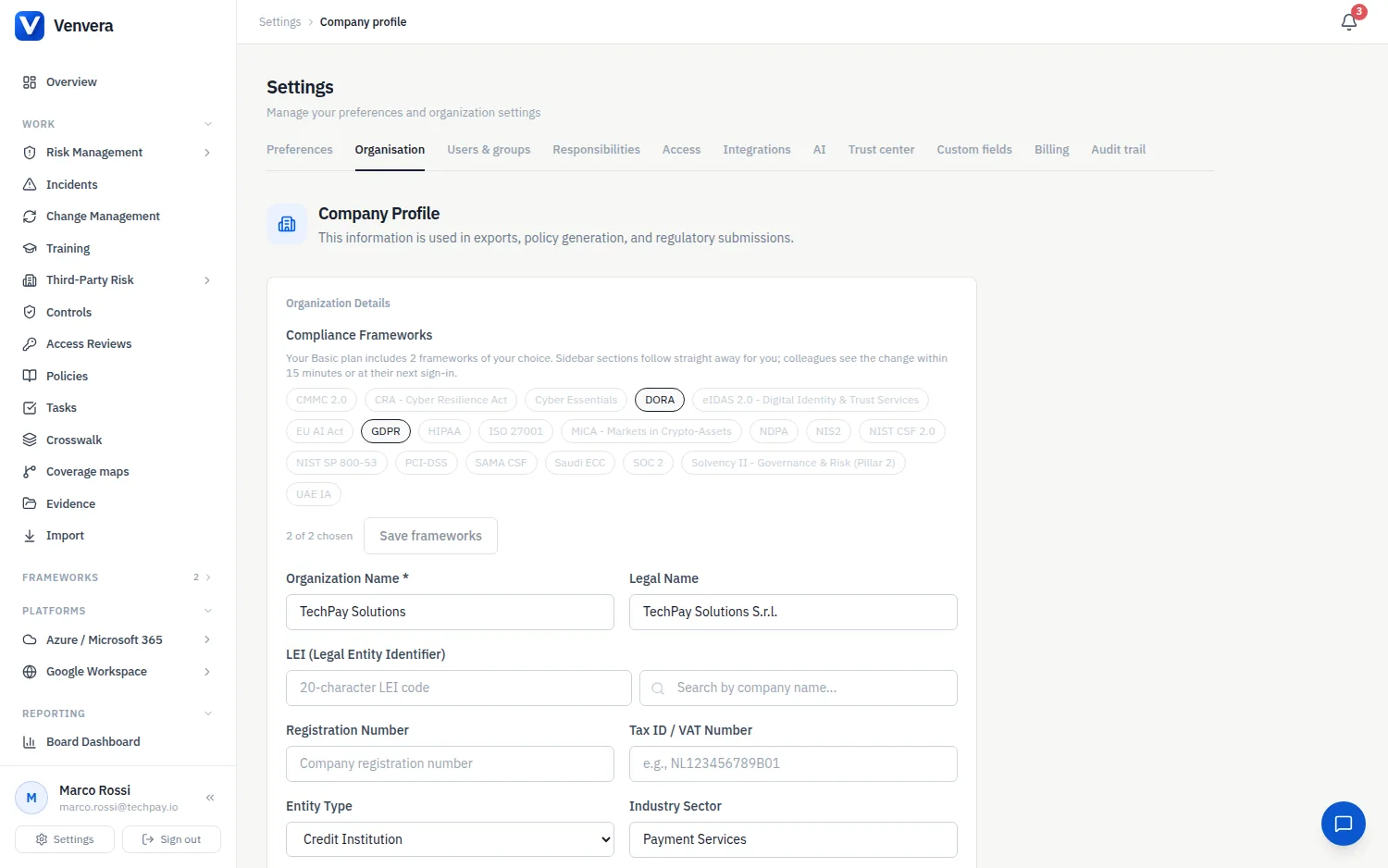
Go to Settings › Company Profile. The Compliance Frameworks block at the top shows every framework in the catalogue, with your current choices highlighted and a counter such as 2 of 2 chosen. You need an administrator role.
Click a framework to choose it, click again to remove it. Once you have reached your plan's number, the remaining frameworks are greyed out until you remove one.
Press Save frameworks. The sidebar updates for you straight away; colleagues see the change within 15 minutes or at their next sign-in. A framework you enable for the first time gets its control library created at that moment, so its pages are ready when you open them.
When the organisation is new
A new organisation starts with no frameworks. The Overview page shows a Choose your frameworks prompt that leads to the Company Profile; the dashboards, assessments and control libraries appear as soon as the first framework is saved.
Changing plan
Upgrading or downgrading never changes the frameworks you have chosen. If a downgrade leaves you with more than the new plan includes, you keep them all; you simply cannot add another until you are back within the allowance. If you want more frameworks than your plan includes, change plan under Settings › Billing or contact Venvera.
Supported frameworks
The catalogue holds 20 frameworks:
- DORA - Digital Operational Resilience Act
- NIS2 - Network and Information Security Directive
- ISO 27001 - international ISMS standard
- GDPR - General Data Protection Regulation
- EU AI Act - Artificial Intelligence Act
- SOC 2, NIST CSF 2.0, NIST SP 800-53, Cyber Essentials, CMMC 2.0, HIPAA, PCI-DSS
- NDPA (Nigeria), UAE IA, Saudi ECC, SAMA CSF
- Solvency II (Pillar 2 governance), eIDAS 2.0, CRA (Cyber Resilience Act), MiCA (Markets in Crypto-Assets)
Each framework has its own section in this help centre describing what the module covers.