
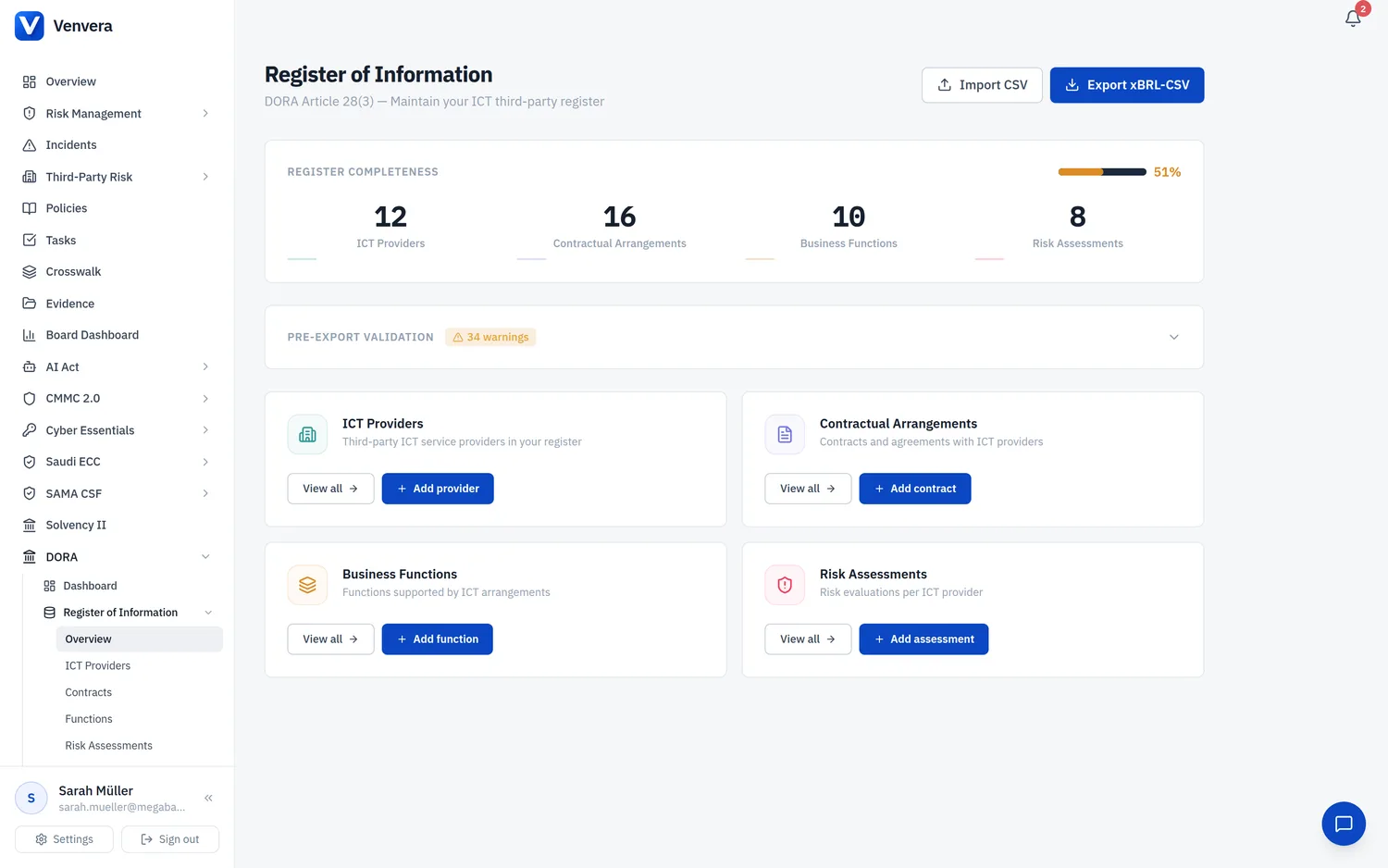
The xBRL-CSV Export page allows you to generate the regulatory filing package that financial entities must submit to their National Competent Authority (NCA) under DORA. The export converts your Register of Information data into the structured format defined by the EBA Implementing Technical Standards (ITS) 2024/2956.
Regulatory Context
What is xBRL-CSV?
xBRL-CSV (eXtensible Business Reporting Language in CSV format) is the data format mandated by the European Banking Authority (EBA) for the submission of ICT third-party register data. It uses standard CSV files that embed XBRL taxonomy references inline, making the data both human-readable and machine-processable by supervisory systems.
Unlike free-form spreadsheets, xBRL-CSV imposes a rigid schema. Each template table has defined column names, data types, enumerated value lists, and cross-reference rules. This ensures that every financial entity across the EU submits data in an identical structure, enabling the ESAs to aggregate, compare, and analyse ICT third-party dependencies across the financial sector.
Who must submit?
All financial entities in scope of DORA (Regulation EU 2022/2554) must maintain a Register of Information and submit it to their NCA. This includes:
- Credit institutions and payment institutions
- Investment firms and fund managers
- Insurance and reinsurance undertakings
- Central securities depositories and trading venues
- Crypto-asset service providers
- Any other entity falling within the DORA scope defined in Article 2
Submission flow
The filing obligation works as follows:
- The financial entity maintains its Register of Information throughout the year.
- At the designated reporting date, the entity generates the xBRL-CSV export from its register.
- The export is submitted to the NCA via the designated filing channel.
- The NCA validates the data and forwards it to the relevant ESA (EBA, EIOPA, or ESMA depending on entity type).
- The ESAs use the aggregated data to assess systemic concentration risk and to identify potential CTPPs under Article 31.
The 15 Template Tables
The ITS defines 15 template tables, each capturing a specific dimension of your ICT third-party arrangements. Venvera generates all 15 tables from the data you have entered across the Register of Information modules.
| Template | Name | Purpose | Source in Venvera |
|---|---|---|---|
| B_01.01 | Entity maintaining the register | Identifies your organisation as the reporting entity. Contains your LEI, entity name, entity type, home member state, and competent authority. | Organisation settings |
| B_01.02 | Entities within scope | Lists all legal entities within your group that use ICT services from third-party providers. For solo entities, this contains a single row. | Organisation and group settings (parent/child entities) |
| B_01.03 | Branches | Lists the branches of in-scope entities, including their country, LEI (if applicable), and address details. | Branches page in RoI |
| B_02.01 | Contractual arrangements - general | Records general information about each contractual arrangement: contract reference, type of arrangement, start/end dates, governing law, and whether it supports a critical or important function. | Contracts page in RoI |
| B_02.02 | Contractual arrangements - specific | Captures the specific ICT services provided under each arrangement, including service descriptions, data processing locations, and service availability levels. | Contracts page in RoI |
| B_02.03 | Intra-group arrangements | Identifies contractual arrangements between entities within the same group (intra-group outsourcing), which are subject to a distinct set of requirements. | Contracts flagged as intra-group |
| B_03.01 | Entities signing arrangements (receiver) | Maps which in-scope entities are the recipients (users) of ICT services under each contractual arrangement. | Contract-entity linkages |
| B_03.02 | ICT providers signing arrangements | Maps which ICT third-party providers are the service suppliers under each contractual arrangement. | Contract-provider linkages |
| B_03.03 | Entities providing ICT services (intra-group) | For intra-group arrangements, identifies which group entity is providing the ICT service to other group entities. | Intra-group contract details |
| B_04.01 | Entities making use of ICT services | Lists the downstream entities that actually use the ICT services, which may differ from the entity that signed the contract (e.g., shared service arrangements). | Contract usage mappings |
| B_05.01 | ICT third-party service providers | A master list of all ICT providers, including their LEI, name, country, type, criticality classification, and CTPP designation status. | Providers page in RoI |
| B_05.02 | ICT service supply chains | Documents the sub-outsourcing chain: which providers sub-outsource to which sub-providers, for which services, and in which countries. | Sub-outsourcing page in RoI |
| B_06.01 | Functions identification | Lists all business functions supported by ICT third-party services, including their criticality designation and the ICT services they rely on. | Functions page in RoI |
| B_07.01 | Assessment of ICT services | Captures the results of risk assessments performed on ICT third-party services, including risk ratings, last assessment date, and identified risks. | Risk Assessments page in RoI |
| B_99.01 | Internal reference definitions | Provides lookup definitions for internal reference codes used across other templates, ensuring cross-referenceability within the filing package. | Auto-generated from all RoI data |
Export Workflow
From the DORA dashboard or the RoI module, click the xBRL-CSV Export button. You can also access it from the top-right action buttons on the dashboard.
The page displays all 15 template tables with their codes and descriptions. This serves as a pre-export checklist - review it to confirm you understand which data will be included.
Click the primary button labelled Generate xBRL-CSV Export. The system will query your entire Register of Information, transform the data into the required CSV schemas, and package the result.
While the export is being generated, the button displays a loading spinner with the text "Generating Export...". Do not navigate away from the page during this process.
Once generation completes, a success confirmation appears showing the timestamp of generation. You have two download options:
- Download ZIP - Downloads all 15 CSV files in a single ZIP archive. The filename follows the format
dora-roi-export-YYYY-MM-DD.zip. - Individual CSV - Each template table is listed with its filename, the number of data rows it contains, and a download button. Use this when you need to inspect or submit individual tables.
The file list table shows the row count for each template. Compare these against your known data. For example, B_05.01 should have one row per provider, and B_02.01 should have one row per contract. Unexpected zeros or low counts may indicate missing data.
If you discover missing data after reviewing the export, update your register, return to the export page, and click the Re-generate button to create a fresh export reflecting the corrections.
Error Handling
If the export fails, an error message is displayed in a red alert box at the top of the page. Common causes include:
| Error | Cause | Resolution |
|---|---|---|
| Export failed | A server-side error occurred during data transformation | Check that your register data is complete and try again. If the error persists, contact support. |
| Missing LEI | Your organisation or one of your entities does not have a Legal Entity Identifier recorded | Navigate to Organisation Settings or the Entities page and enter the LEI. |
| Incomplete contracts | One or more contractual arrangements are missing required fields (e.g., start date, contract type) | Open the flagged contracts in the Contracts page and complete all required fields. |
| Unlinked functions | Business functions exist but are not linked to any contractual arrangement | In the Functions page, link each function to the relevant contract(s). |
Validation Best Practices
Template Details Reference
B_01.xx - Entity Information
The first three tables establish the identity and organisational structure of the reporting entity. B_01.01 is always a single row identifying your organisation. B_01.02 lists group entities, and B_01.03 enumerates their branches. These tables set the foundation for the entity references used throughout the rest of the filing.
B_02.xx - Contractual Arrangements
These tables document every ICT third-party contract. B_02.01 captures the "header" information (dates, governing law, criticality), while B_02.02 drills into the specific ICT services delivered under each contract. B_02.03 handles the subset of contracts between group entities.
B_03.xx - Signing Parties
These mapping tables identify who is on each side of every contract. They enable the NCA to trace which entities use which providers, even in complex group structures where one entity signs a master contract that other entities benefit from.
B_04.01 - ICT Service Usage
This table captures the downstream usage dimension: which entities actually consume the ICT services, regardless of who signed the contract. It is particularly relevant for shared services or centralised ICT procurement models.
B_05.xx - Provider and Supply Chain
B_05.01 is the master provider register. B_05.02 extends it by documenting the sub-outsourcing chain - essential for identifying hidden concentration risk in the supply chain.
B_06.01 - Functions
Documents the business functions that depend on ICT third-party services, with their criticality designation. This links the operational dimension (what the entity does) to the contractual dimension (who provides the ICT).
B_07.01 - Risk Assessments
Captures the outcomes of the entity's assessment of ICT third-party services. Supervisors use this to understand how entities evaluate and manage the risks associated with their ICT dependencies.
B_99.01 - Internal References
A lookup table for internal reference codes. This ensures that cross-references between templates are resolvable and consistent. It is auto-generated from your data.