
Risk Register
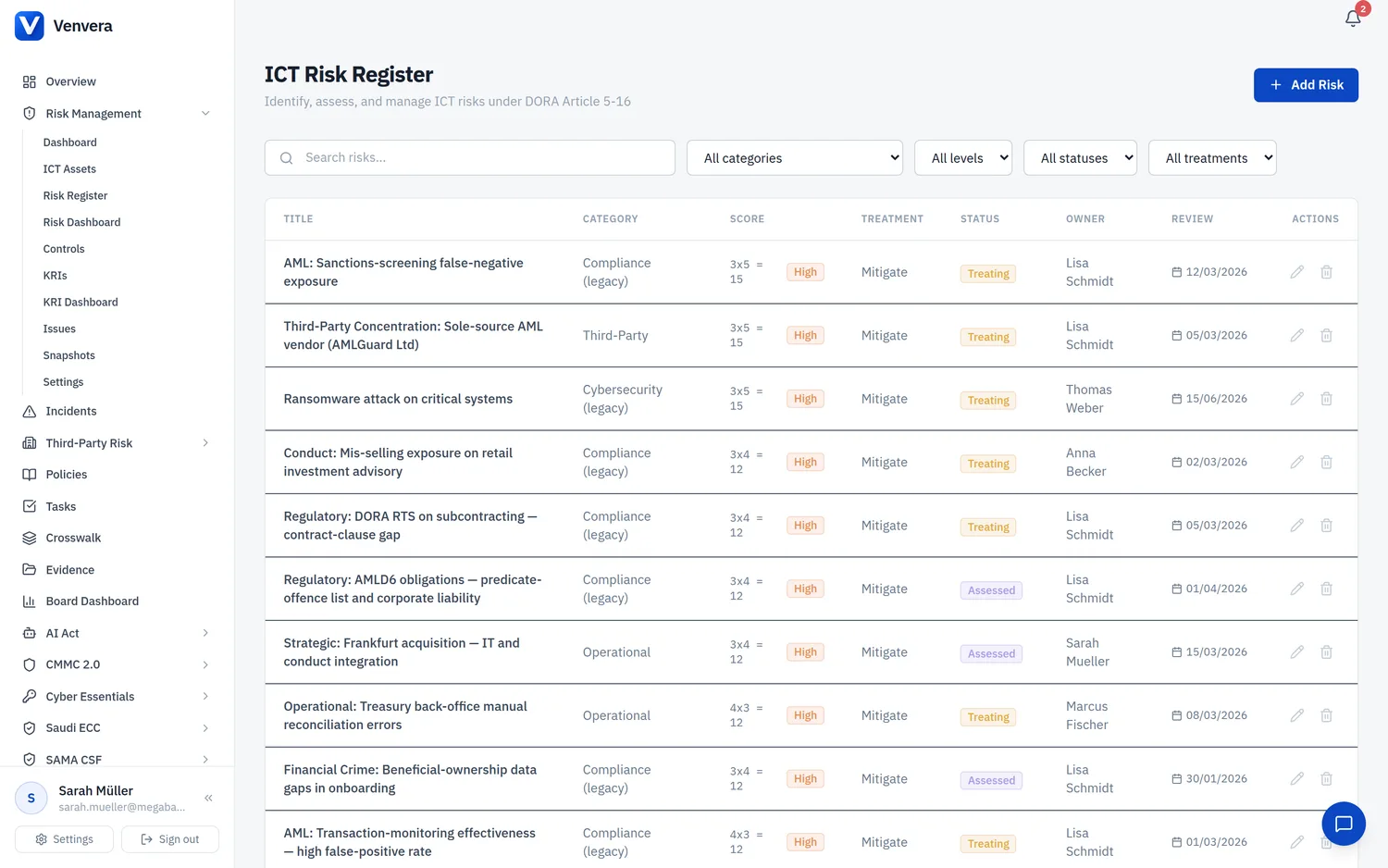
The risk register is the main working page for viewing, filtering, and managing all ICT risks.
Filters
| Filter | Options | Description |
|---|---|---|
| Search | Free text | Search by risk title or description text. |
| Category | Cybersecurity, Data Breach, System Failure, Third Party, Change Management, Access Control, Physical Security, Compliance, Operational, Other | Filter risks by their assigned category. |
| Level | Low, Medium, High, Critical | Filter by the calculated inherent risk level derived from the Likelihood x Impact score. |
| Status | Identified, Assessed, Treating, Monitoring, Closed | Filter by the current stage of the risk management lifecycle. |
| Treatment | Mitigate, Accept, Transfer, Avoid | Filter by the chosen treatment decision. |
Table Columns
| Column | Description |
|---|---|
| Title | The risk title. Click to open the risk detail/edit form. |
| Category | The risk category (e.g., Cybersecurity, Data Breach). |
| Score | Displayed as L x I = Score (e.g., 4 x 5 = 20) with a color-coded level badge (Low/Medium/High/Critical). |
| Treatment | The treatment decision: Mitigate, Accept, Transfer, or Avoid. |
| Status | The lifecycle status of the risk. |
| Owner | The person or role responsible for managing this risk. |
| Review Date | The next scheduled review date for this risk. |
Creating or Editing a Risk
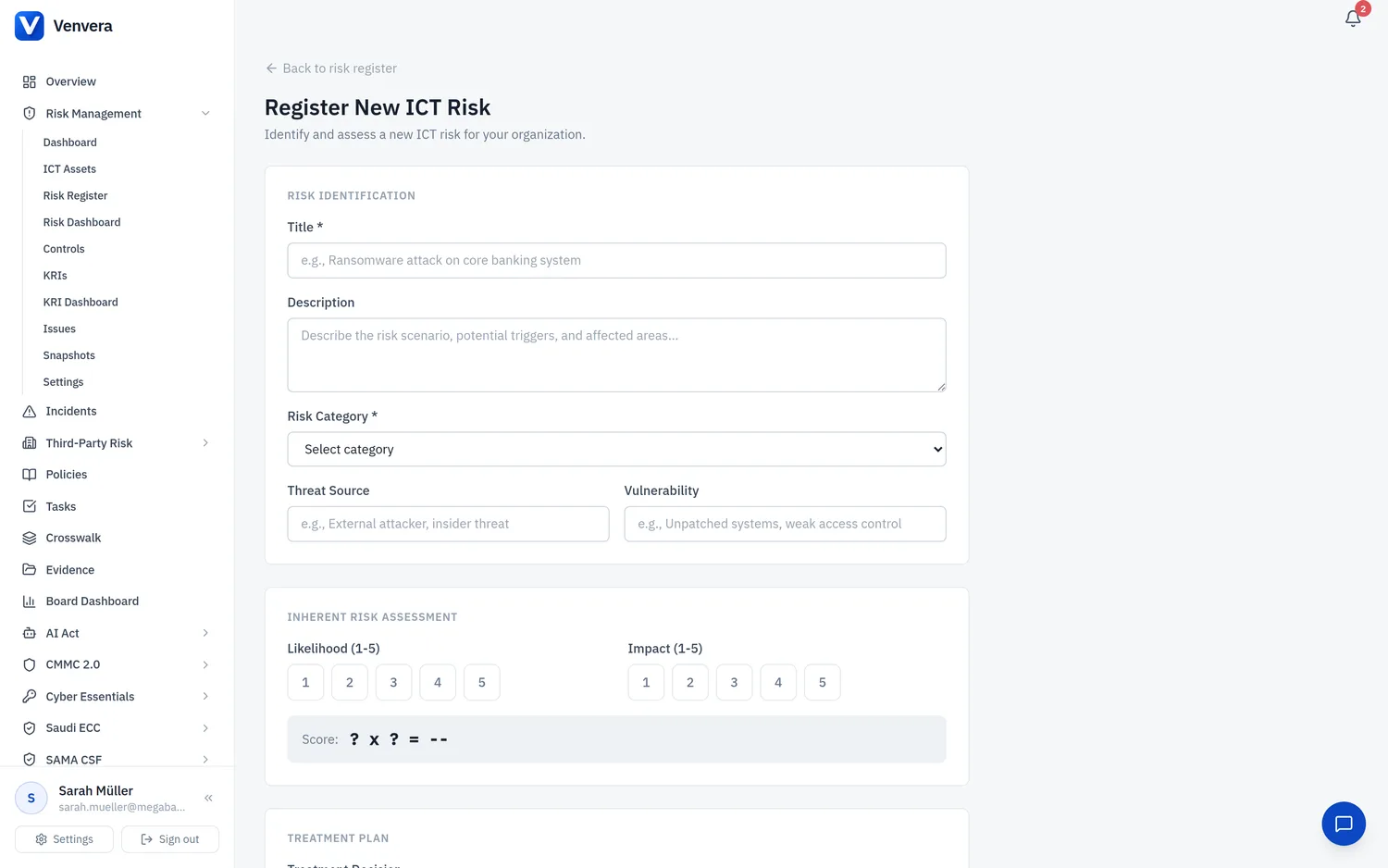
Click New Risk to create a new entry, or click an existing risk title to edit it. The risk form is divided into multiple sections.
Basic Information
| Field | Type | Description |
|---|---|---|
| Title | Text input | A concise name for the risk. Required |
| Description | Textarea | A detailed narrative of the risk scenario, including potential causes and consequences. Optional |
| Risk Category | Select dropdown | Choose from: Cybersecurity, Data Breach, System Failure, Third Party, Change Management, Access Control, Physical Security, Compliance, Operational, Other. Required |
| Threat Source | Text input | The origin of the threat (e.g., "External attacker", "Disgruntled employee", "Natural disaster"). Optional |
| Vulnerability | Text input | The specific weakness that could be exploited (e.g., "Unpatched web server", "No MFA on admin accounts"). Optional |
Inherent Risk Assessment
The inherent risk assessment captures the risk level before any controls or treatment measures are applied.
| Field | Type | Description |
|---|---|---|
| Likelihood | 1-5 pill selector | Rate the probability of the risk materializing on a scale of 1 (Rare) to 5 (Almost Certain). Click a pill to select. |
| Impact | 1-5 pill selector | Rate the potential business impact on a scale of 1 (Negligible) to 5 (Catastrophic). Click a pill to select. |
| Score | Auto-calculated display | Automatically calculated as Likelihood x Impact. Displayed with a color-coded level badge (Low 1-4, Medium 5-9, High 10-15, Critical 16-25). |
Treatment
| Field | Type | Description |
|---|---|---|
| Treatment Decision | Radio buttons | Select one of four treatment strategies: • Mitigate - Implement controls to reduce likelihood or impact. • Accept - Acknowledge the risk and take no further action (within appetite). • Transfer - Shift the risk to a third party (e.g., insurance, outsourcing). • Avoid - Eliminate the risk by removing the activity or system. |
| Treatment Description | Textarea | Detail the specific actions being taken or planned for the chosen treatment strategy. Optional |
Residual Risk Assessment
The residual risk assessment captures the risk level after treatment measures and controls have been applied or are planned.
| Field | Type | Description |
|---|---|---|
| Residual Likelihood | 1-5 pill selector | The expected likelihood after treatment measures are in place. |
| Residual Impact | 1-5 pill selector | The expected impact after treatment measures are in place. |
| Residual Score | Auto-calculated display | Residual Likelihood x Residual Impact, displayed with a level badge. |
Risk Tolerance
| Field | Type | Description |
|---|---|---|
| Risk Tolerance | Radio buttons | Indicate whether the residual risk falls within the organization's appetite: • Within Tolerance - Residual risk is acceptable per risk appetite settings. • Above Tolerance - Residual risk exceeds appetite; additional treatment or monitoring needed. • Requires Escalation - Risk exceeds escalation threshold and must be reported to senior management or the board. |
Risk Status
| Field | Type | Description |
|---|---|---|
| Risk Status | Select dropdown | The lifecycle stage of the risk: • Identified - Risk has been recognized but not yet assessed. • Assessed - Risk has been scored and categorized. • Treating - Treatment actions are actively being implemented. • Monitoring - Treatment is in place; risk is being monitored for changes. • Closed - Risk has been eliminated or is no longer relevant. |
Linked Entities
| Field | Type | Description |
|---|---|---|
| Linked Assets | Multi-select checkboxes | Select one or more ICT assets from the asset register that are affected by or related to this risk. |
| Business Functions | Multi-select checkboxes | Select the business functions impacted by this risk. Functions marked as critical in the Register of Information display a Critical badge. |
| ICT Controls | Multi-select checkboxes | Select the controls that mitigate or address this risk. This creates a bidirectional link between risks and controls. |
Regulatory References
Map the risk to specific regulatory requirements across the frameworks below. A single risk can be tagged to many frameworks at once - the framework toggles available depend on which frameworks you have enabled in your tenant.
| Framework | Type | Description |
|---|---|---|
| DORA Articles | Toggle buttons | Select applicable DORA articles from Art. 5 through Art. 16. Each button has a tooltip explaining the article's scope (e.g., Art. 5: ICT Risk Management Framework, Art. 6: ICT Systems and Tools, etc.). |
| NIS2 Articles | Toggle buttons | Select applicable NIS2 cybersecurity measures from Art. 21(2)(a) through Art. 21(2)(j), covering areas such as risk analysis, incident handling, business continuity, supply chain security, and cryptography. |
| ISO 27001 Controls | Toggle buttons | Select applicable ISO 27001:2022 Annex A controls from A.5 (Organizational) through A.8 (Technological). |
Regulatory references create traceability between your risk register and compliance obligations. They also feed into gap assessment and board reporting modules.
Review Dates
| Field | Type | Description |
|---|---|---|
| Review Date | Date picker | The date this risk was last reviewed. Optional |
| Next Review Date | Date picker | The scheduled date for the next risk review. When this date passes, the risk will appear in the Overdue Reviews count on the dashboard. Optional |
DORA requires periodic review of ICT risks. Setting appropriate review dates ensures your risk register remains current and audit-ready. Risks without a next review date will not trigger overdue alerts.