
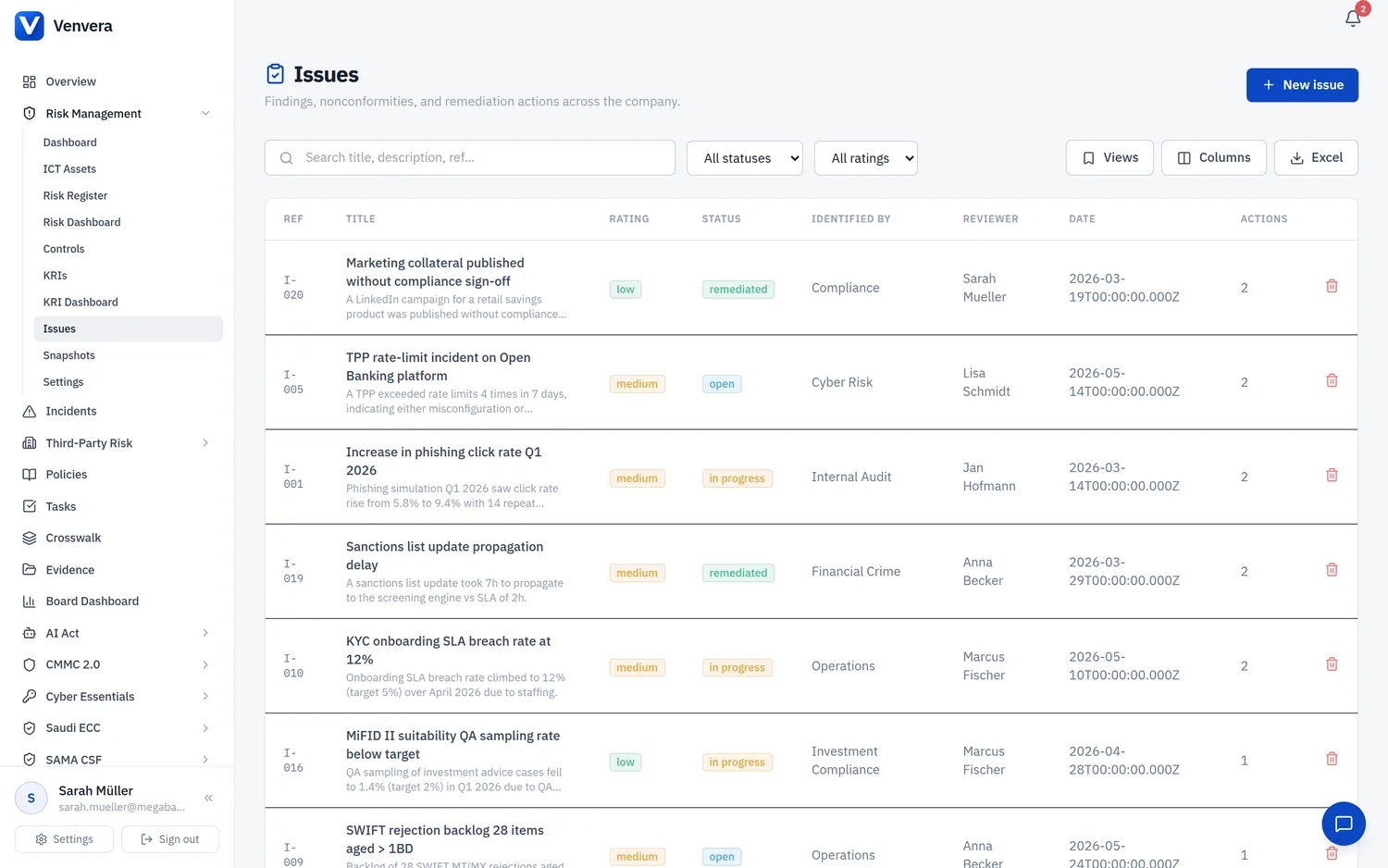
The Issues register is where you record control weaknesses, audit findings, and other shortcomings that must be tracked to closure, together with the remediation actions taken to resolve them. You will find it in the Risk section of the sidebar.
The issues register
The list shows every open and historical issue. Each row carries:
| Column | Description |
|---|---|
| Ref | An automatically assigned issue reference. |
| Title | A short name for the issue. Click it to open the detail page. |
| Rating | The severity of the issue: Low, Medium, or High. |
| Status | Open, In progress, Remediated, or Closed. |
| Identified by / date | Who raised the issue and when. |
| Reviewer | The user responsible for reviewing the issue and its remediation. |
The toolbar lets you search by reference, title, or description and filter by rating and status, so a long register stays manageable.
Issue detail and remediation actions
Opening an issue shows its full description and the remediation actions attached to it. Each action records:
- An action reference and the owner responsible for delivering it.
- An initial due date and, where a date slips, a retargeted due date.
- The action to be taken and a rolling status update as work progresses.
- A recommendation and observation, plus an auditor assurance review field for independent sign-off.
Tracking remediation actions against each issue gives you a clear, auditable trail from "weakness identified" through to "remediated and assured", which is exactly what an auditor or regulator expects to see.