
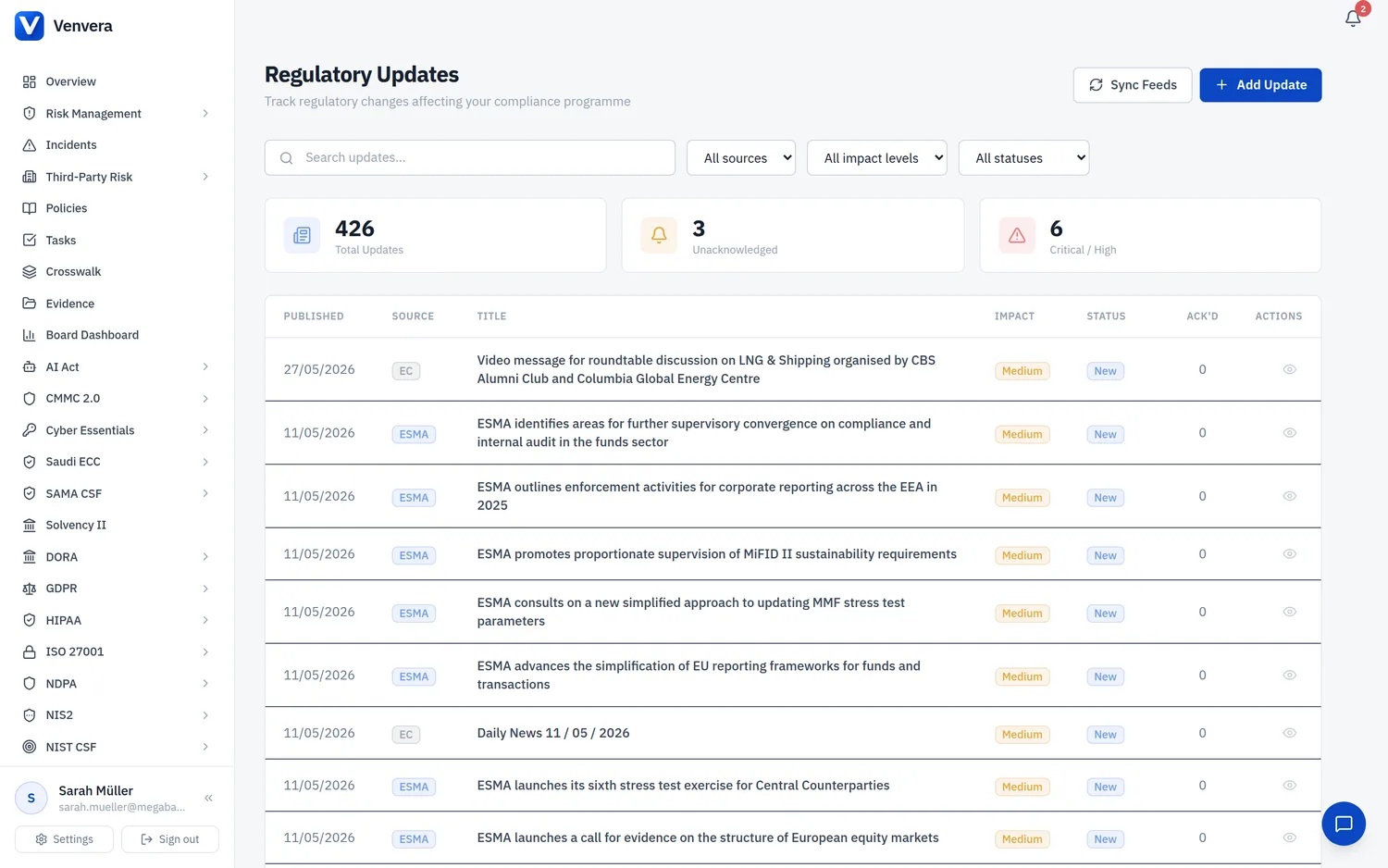
Regulatory updates from EBA, ESMA, ENISA and the national authorities, tagged to the frameworks you actually run and linked to the controls they affect. (37 seconds)
The Regulatory Updates page provides a centralized tracker for monitoring regulatory developments, guidance publications, and legislative changes that affect your organization's compliance programmes. This module helps your compliance team stay informed about updates from European Supervisory Authorities, national competent authorities, and other regulatory bodies, and assess their impact on your existing compliance posture.
All users with the
regulatory_updates.view permission can view regulatory updates, acknowledge them, and add notes. Only users with the regulatory_updates.manage permission (typically Admin role) can create new updates, change statuses, perform impact assessments, and sync feeds.
Regulatory Updates List
The main page displays all tracked regulatory updates in a list view, ordered by published date (most recent first). Each update card shows the title, source badge, published date, impact level indicator, status badge, and a brief summary. Click any update to open its detail view.
Sources
Regulatory updates can originate from a variety of authoritative sources. The source is displayed as a badge on each update card and is used as a filter criterion.
| Source | Full Name | Description |
|---|---|---|
| ESA | European Supervisory Authorities | Joint publications from EBA, EIOPA, and ESMA, including joint guidelines, regulatory technical standards (RTS), and implementing technical standards (ITS) |
| EBA | European Banking Authority | Banking-sector specific guidance, guidelines, and technical standards, including DORA-related RTS and ITS |
| EIOPA | European Insurance and Occupational Pensions Authority | Insurance and pensions sector guidance, particularly relevant for DORA and Solvency II |
| ESMA | European Securities and Markets Authority | Securities and markets sector guidance, relevant for investment firms and market infrastructure |
| ECB | European Central Bank | Supervisory expectations, TIBER-EU framework updates, and monetary policy-adjacent guidance with compliance implications |
| NCA | National Competent Authority | Country-specific regulatory guidance from national supervisors such as BaFin (Germany), ACPR (France), DNB (Netherlands), and others |
| EC | European Commission | Legislative proposals, delegated acts, implementing acts, and policy communications from the European Commission |
| ENISA | European Union Agency for Cybersecurity | Cybersecurity guidance, threat landscape reports, and NIS2 implementation guidance |
| EUR-Lex | EUR-Lex | Official Journal of the EU publications, including final regulatory texts, corrigenda, and consolidated versions of regulations and directives |
| Other | Other Sources | Updates from industry bodies (e.g., ISACA, ISO), professional associations, or other relevant non-regulatory sources that impact compliance |
Impact Levels
Each regulatory update is assigned an impact level that indicates the severity of its effect on your organization's compliance obligations:
| Level | Colour | Criteria |
|---|---|---|
| Critical | Red | Fundamental changes to compliance requirements, new mandatory obligations with near-term deadlines, or enforcement actions that require immediate board attention and action |
| High | Orange | Significant regulatory changes that require updates to existing policies, procedures, or controls within a defined timeline. May require budget allocation or organizational changes. |
| Medium | Yellow | Moderate regulatory developments that may require adjustments to current compliance programmes. Typically guidance or clarifications of existing requirements. |
| Low | Green | Minor updates, informational publications, or developments with limited direct impact on current compliance obligations. Important for awareness but do not require immediate action. |
Status Workflow
Each regulatory update progresses through a status workflow that tracks your organization's response:
| Status | Description | Typical Next Status |
|---|---|---|
| New | The update has been added to the tracker but has not yet been reviewed by the compliance team. This is the default status for newly created or synced updates. | Under Review |
| Under Review | The compliance team is actively assessing the update to determine its impact on the organization and what actions, if any, are required. | Action Needed, Not Applicable |
| Action Needed | The review has determined that the update requires specific actions from the organization (e.g., policy updates, control changes, gap assessment revisions). The impact assessment section should detail the required actions. | Resolved |
| Resolved | All required actions have been completed and the organization is compliant with the requirements or expectations set out in the update. | - |
| Not Applicable | The review has determined that the update does not apply to the organization (e.g., sector-specific guidance for a different sector, or requirements for a framework not adopted by the organization). | - |
Use the status workflow to drive your regulatory change management process. Moving an update from "New" through "Under Review" to "Resolved" creates an auditable trail of how your organization assessed and responded to each regulatory development.
Creating a Regulatory Update
Admin users can manually create regulatory updates to track developments that are not captured by automated feed synchronization.
Click the Add Update button at the top of the Regulatory Updates page. A form dialog or page opens with all required and optional fields.
Complete all required fields as described in the field reference table below. At minimum, you must provide the Title, Source, Published Date, Impact Level, and Summary.
Optionally provide a URL to the source document, select the Affected Modules using the toggle buttons, and add any Action Required notes describing what the organization needs to do.
Click Save to create the regulatory update. It will appear in the list with a "New" status. The creation is recorded in the audit trail.
Create Form Fields
| Field | Type | Required | Description |
|---|---|---|---|
| Title | Text input | Required | A clear, descriptive title for the regulatory update. Should include the issuing body and document reference where applicable (e.g., "EBA Final Report on RTS for ICT Risk Management Framework under DORA"). |
| Source | Dropdown | Required | Select the regulatory body or source that published the update. Options: ESA, EBA, EIOPA, ESMA, ECB, NCA, EC, Other. (ENISA and EUR-Lex appear as filters in the list view but are not options on this create form.) |
| Published Date | Date picker | Required | The date the update was officially published by the source. This determines the sort order in the list view. |
| Impact Level | Dropdown | Required | The assessed impact level: Critical, High, Medium, or Low. This determines the visual indicator on the update card. |
| Summary | Textarea | Required | A detailed summary of the regulatory update, including its key provisions, requirements, timelines, and relevance to the organization. This should be comprehensive enough that team members can understand the update without reading the full source document. |
| URL | URL input | Optional | A link to the source document on the issuing body's website or EUR-Lex. Providing this allows team members to access the full text directly. |
| Affected Modules | Toggle buttons | Optional | Select which platform modules are affected by this update. Available toggles: RoI (Register of Information), Risk Management, Gap Assessment, Incidents, TPRM (Third-Party Risk Management), Policies. Multiple modules can be selected. This helps filter and route updates to the relevant teams. |
| Action Required | Textarea | Optional | A description of what specific actions the organization needs to take in response to this update. For example: "Update ICT risk management policy to incorporate new RTS requirements by Q2 2026." |
Impact Assessment
The Impact Assessment section on the detail page of a regulatory update allows admin users to create per-module impact entries. For each affected module, you can document how the update impacts that specific area of your compliance programme, what changes are needed, the priority, and the target completion date. This creates a structured action plan that can be tracked through to resolution.
Each impact assessment entry includes fields for the module name, impact description, required actions, assigned owner, priority level, and target date. Multiple entries can be added for a single regulatory update when it affects several modules differently.
Automated Impact Assessment
Beyond entering impacts by hand, Venvera can assess an update's impact for you. It reads the update's affected modules and automatically maps them to the affected frameworks' controls and assessments and any related policies, so you can see what the change touches without tracing it manually. If you choose to generate tasks, it also creates remediation tasks for the mapped items, turning the update straight into tracked work.
Update Detail View
The detail view for a regulatory update shows the full information including all fields from the create form, the current status, and the complete history of status changes and acknowledgments.
Status Change (Admin Only)
Admin users can change the status of a regulatory update using the status dropdown on the detail page. Selecting a new status and saving creates an auditable record of the transition. A comment can be added to explain the reason for the status change.
Team Acknowledgment (All Users)
All users with access to regulatory updates can acknowledge that they have reviewed an update. The acknowledgment feature records the user's name, timestamp, and any notes they provide. This creates an auditable record that demonstrates team awareness of regulatory developments, which is valuable for compliance audits.
Click on a regulatory update in the list to open its detail view.
Read the summary, review the affected modules, and check the action required notes. Follow the URL link to read the full source document if needed.
Click the Acknowledge button. Optionally add notes about your assessment or any concerns. Your acknowledgment is recorded with your name and timestamp.
Sync Feeds
The Sync Feeds button pulls newly published items from Venvera's configured RSS feeds (EBA, ESMA, ENISA, ECB, EC, EU AI Office, EUR-Lex, plus national feeds such as BaFin and CSSF based on your jurisdiction) and adds them with a "New" status. Anyone who can view regulatory updates can run a sync; only creating updates manually requires the Admin role. Duplicate items are skipped via a per-feed unique key.
Feed synchronization depends on external source availability. If a source is temporarily unavailable, the sync will complete for all other sources and report any errors. You can retry the sync later for any failed sources.
Filtering and Search
The regulatory updates list can be filtered by source, impact level, status, and affected module. A search box allows free-text search across titles and summaries. Combining filters helps you quickly find relevant updates, for example filtering by "EBA" source and "Action Needed" status to see all EBA updates requiring your attention.