
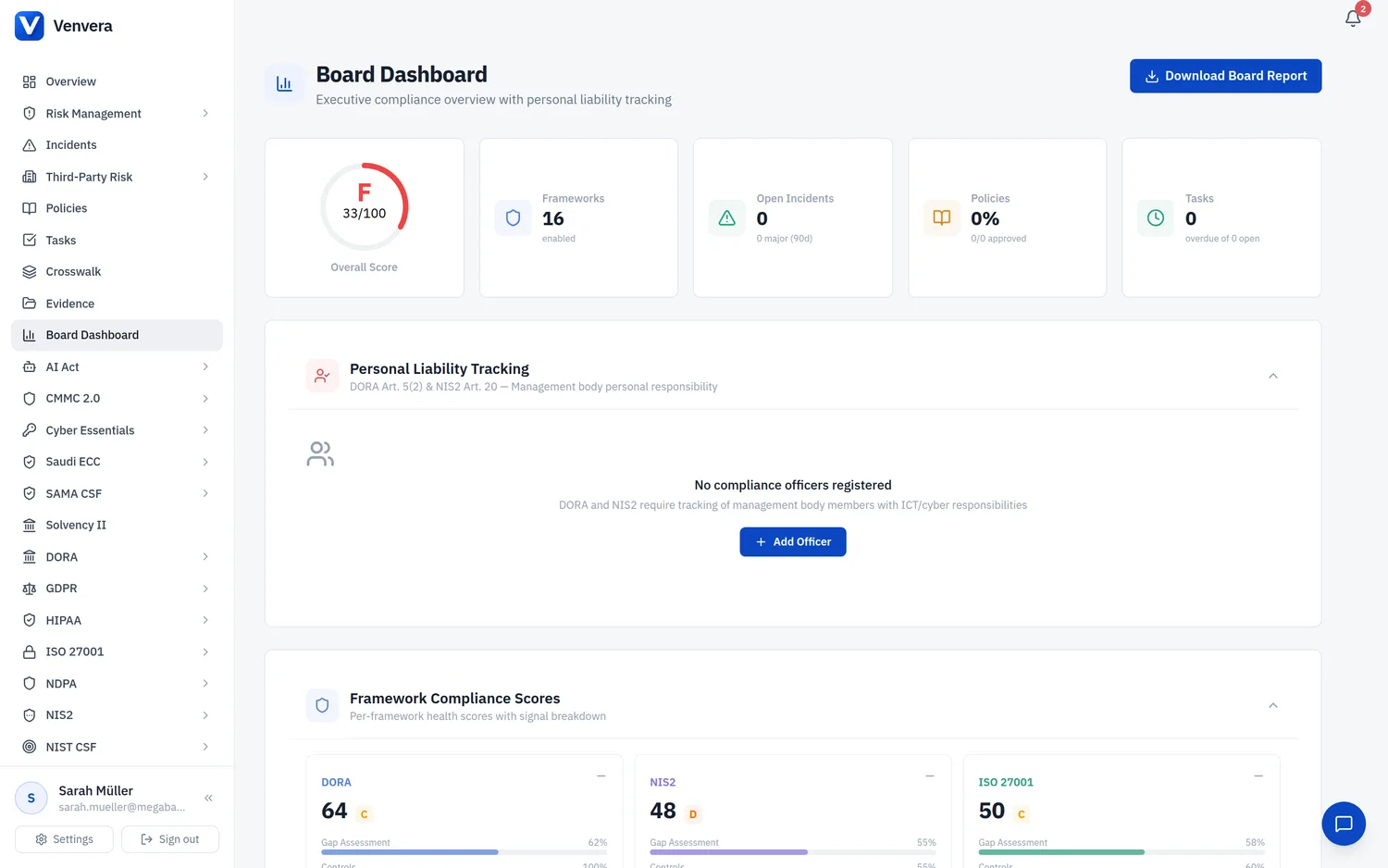
Reporting from live data: board packs, framework readiness and gap reports in DOCX and PDF, plus xBRL-CSV for the Register of Information. (38 seconds)
The Board Reports page provides executive-level compliance reports across your regulatory frameworks. Each report is generated on-demand from your current platform data and downloaded as a professionally formatted Microsoft Word document (.docx). These reports are designed to be presented directly to your board of directors, management body, or supervisory authority without additional formatting.
You must have the
reports.generate permission assigned to your role to access the Board Reports page and generate reports. Contact your organization administrator if you cannot see this page.
Available Reports
The Board Reports page lists the available executive reports in a table. Each row names the report, its framework, and the download format. Click the Download Report button on a row to generate and download that report.
| Report | Framework | Format |
|---|---|---|
| Unified Board Report | All enabled frameworks | Word .docx |
| DORA Board Report | Digital Operational Resilience Act | Word .docx |
| NIS2 Board Report | NIS2 Directive | Word .docx |
| ISO 27001 Board Report | ISO/IEC 27001:2022 | Word .docx |
| GDPR Board Report | General Data Protection Regulation | Word .docx |
| AI Act Board Report | EU AI Act | Word .docx |
| SOC 2 Board Report | AICPA Trust Services Criteria | Word .docx |
| NIST CSF Board Report | NIST Cybersecurity Framework 2.0 | Word .docx |
| HIPAA Board Report | HIPAA Security / Privacy / Breach | Word .docx |
| NDPA Board Report | Nigeria Data Protection Act 2023 | Word .docx |
| Risk Management Board Report | ICT risk heatmap and controls | Word .docx |
| CMMC Board Report | CMMC 2.0 | Word .docx |
| Saudi ECC Board Report | NCA Essential Cybersecurity Controls | Word .docx |
| Cyber Essentials Board Report | UK NCSC Cyber Essentials / CE+ | Word .docx |
| SAMA CSF Board Report | SAMA Cyber Security Framework | Word .docx |
| Risk Management Data Export | Risk register and controls | Excel .xlsx |
The report list is a table, not a grid of colour-coded cards. Which reports appear does not depend on your enabled frameworks - every report is listed - but a report for a framework you do not use will show mostly empty sections.
Unified Board Report
The Unified Board Report is a single multi-framework document for board presentation. Alongside per-framework compliance status and top risks, it includes a Personal Liability Tracking section that names management-body officers and their outstanding compliance obligations under DORA Article 5(2) and NIS2 Article 20.
Data exports (Excel and xBRL-CSV)
Two outputs on this page are not Word documents. The Risk Management Data Export produces an Excel (.xlsx) workbook of your risk register, controls, ICT assets, risk scores and cross-reference mappings. For DORA regulatory filing, the Register of Information export (linked at the bottom of the page) produces the xBRL-CSV package for submission to your competent authority.
DORA Board Report
The DORA Board Report provides a comprehensive overview of your organization's compliance posture under the Digital Operational Resilience Act (Regulation (EU) 2022/2554). This report is structured to satisfy the management body's oversight obligations under Article 5 DORA.
Report Sections
- Compliance Score - An overall percentage score reflecting your organization's DORA readiness. This score is calculated from your Gap Assessment completion, policy coverage, incident response maturity, third-party risk posture, and resilience testing programme status. A breakdown chart shows scores per DORA chapter.
- Gap Assessment Summary - A detailed summary of your DORA gap assessment results, including the number of requirements assessed, compliant items, partially compliant items, non-compliant items, and not-applicable items. Each DORA chapter (ICT Risk Management, Incident Management, Digital Operational Resilience Testing, Third-Party Risk, Information Sharing) is reported separately with a compliance percentage.
- Incidents Overview - Statistics on ICT-related incidents reported during the current reporting period. Includes total incident count, classification breakdown (Major, Significant, Minor), mean time to detect (MTTD), mean time to resolve (MTTR), incidents reported to competent authorities, and trend comparison against the prior period.
- Third-Party Risk Management (TPRM) - A summary of your ICT third-party service provider landscape. Reports the total number of providers, criticality distribution (Critical, Important, Standard), contract compliance status, concentration risk indicators, and any providers flagged for remediation or exit planning.
- Resilience Testing - Status of your digital operational resilience testing programme. Covers the number of tests planned, executed, and pending; test types conducted (vulnerability assessments, penetration tests, scenario-based tests, TLPT); findings severity distribution; and remediation progress on identified issues.
NIS2 Board Report
The NIS2 Board Report addresses the reporting obligations under the NIS2 Directive (Directive (EU) 2022/2555) and provides the management body with visibility into cybersecurity risk management measures and incident handling.
Report Sections
- Article 21 Measures - Status of implementation for each of the cybersecurity risk management measures required under Article 21, including policies on risk analysis and information system security, incident handling, business continuity and crisis management, supply chain security, security in network and information systems acquisition, policies and procedures to assess the effectiveness of measures, basic cyber hygiene practices and training, cryptography and encryption policies, human resources security, access control policies, and asset management.
- Incident Notifications - Summary of significant incidents and notifications submitted to the CSIRT or competent authority. Covers early warnings (within 24 hours), incident notifications (within 72 hours), intermediate reports, and final reports. Includes counts and compliance with notification timelines.
- Supply Chain Security - Assessment of supply chain and supplier relationship security measures. Reports the number of critical suppliers assessed, vulnerabilities identified in the supply chain, and mitigation measures in place.
- Gap Assessment - NIS2-specific gap assessment results showing compliance status per Article 21 measure, overall readiness percentage, and priority remediation items.
ISO 27001 Board Report
The ISO 27001 Board Report supports management review meetings as required by clause 9.3 of ISO/IEC 27001:2022. It provides a structured summary of your Information Security Management System (ISMS) performance.
Report Sections
- Annex A Controls - Implementation status of Annex A controls from ISO/IEC 27001:2022. Organized by control theme (Organizational, People, Physical, Technological), showing implemented, partially implemented, not implemented, and not applicable counts for each of the 93 controls.
- Audits - Internal and external audit findings summary. Lists completed audits, open findings by severity, corrective actions in progress, and overdue corrective actions.
- Nonconformities - Register of major and minor nonconformities identified during audits or operations. Shows open, in-progress, and closed nonconformities with aging analysis.
- Certification Status - Current certification status including certification body, certificate validity dates, surveillance audit schedule, and transition status to the 2022 revision if applicable.
- Gap Assessment - ISO 27001 clause-by-clause gap assessment results, covering clauses 4 through 10, with a separate Annex A applicability assessment summary.
GDPR Board Report
The GDPR Board Report provides the Data Protection Officer and management with visibility into data protection compliance under Regulation (EU) 2016/679.
Report Sections
- Processing Activities - Summary of the Record of Processing Activities (ROPA) maintained under Article 30. Reports total processing activities, breakdown by legal basis (consent, contract, legal obligation, vital interests, public task, legitimate interests), data categories processed, and processing activities involving special category data.
- Data Subject Requests (DSRs) - Statistics on data subject rights requests received and processed. Covers request types (access, rectification, erasure, restriction, portability, objection), total received, completed within the 30-day deadline, overdue requests, and average response time.
- Breaches - Personal data breach register summary. Reports total breaches recorded, breaches notified to the supervisory authority (within 72 hours under Article 33), breaches communicated to data subjects (under Article 34), breach severity distribution, and root cause analysis.
- Data Protection Impact Assessments (DPIAs) - Status of DPIAs conducted under Article 35. Lists completed assessments, assessments in progress, high-risk processing activities requiring DPIA, and residual risks identified.
- International Transfers - Overview of personal data transfers to third countries or international organisations. Reports transfer mechanisms used (adequacy decisions, SCCs, BCRs, derogations), recipient countries, and any transfers flagged for review following Schrems II considerations.
AI Act Board Report
The AI Act Board Report addresses compliance with the EU AI Act (Regulation (EU) 2024/1689) and provides governance visibility into AI system deployment and risk management.
Report Sections
- AI Systems Inventory - Complete inventory of AI systems deployed, developed, or procured by the organization. Shows total system count, deployment status (production, development, retired), provider vs. deployer role breakdown, and systems by business function.
- Risk Classification - Distribution of AI systems by risk level as defined in the AI Act: Unacceptable Risk (prohibited), High-Risk (Annex III), Limited Risk (transparency obligations), and Minimal Risk. Includes justification summaries for each classification decision.
- AI Incidents - Incidents involving AI systems, including malfunctions, safety events, fundamental rights impacts, and bias detections. Reports incident count, severity, affected systems, and corrective actions taken.
- Conformity Assessments - Status of conformity assessments for high-risk AI systems. Covers self-assessments, third-party assessments, technical documentation completeness, and CE marking readiness.
- General-Purpose AI (GPAI) - Compliance status for any general-purpose AI models used, including transparency obligations, copyright compliance, technical documentation, and systemic risk assessments for models exceeding the computational threshold.
Downloading a Report
Open the sidebar and click Reports under the Reports & Settings section. The Board Reports page displays all five framework report cards.
Identify the report you need by its colour-coded card and framework name. Review the brief description on the card to confirm it covers the sections you require.
Click the Download Report button on the desired card. The platform will immediately begin generating the report from your current data. A loading spinner appears on the button during generation.
Once generated, the .docx file downloads automatically through your browser. The filename follows the pattern: [Framework]-Board-Report-[YYYY-MM-DD].docx. Open it in Microsoft Word, Google Docs, or any compatible word processor.
Review the generated report for accuracy. The report reflects data as of the moment of generation. Add any manual commentary or board-specific context before distributing to your management body.
Reports are generated on-demand from live platform data. For the most accurate reporting, ensure all modules are up to date before generating a board report. There is no limit on how many times you can generate a report.
If a module has no data (for example, no incidents have been recorded), the corresponding section in the report will indicate that no records are available. The report will still generate successfully; empty sections are clearly labelled rather than omitted.
Report Formatting
All generated reports follow a consistent professional format suitable for board presentation:
- Cover page with your organization name, report title, framework name, generation date, and Venvera branding
- Table of contents with hyperlinked section headings
- Executive summary with key metrics and compliance score
- Detailed sections with tables, charts description, and narrative summaries
- Colour-coded status indicators matching the framework theme colour
- Footer with page numbers and confidentiality notice
Frequently Asked Questions
Can I schedule automatic report generation?
Currently, reports are generated on-demand only. Scheduled generation is planned for a future release.
What period does the report cover?
Reports include all current data in the platform at the time of generation. Historical comparison data (e.g., incident trends) typically covers the current quarter versus the previous quarter.
Can I customise the report content?
The report structure is fixed per framework to ensure regulatory completeness. You may add custom content after downloading the Word document.