
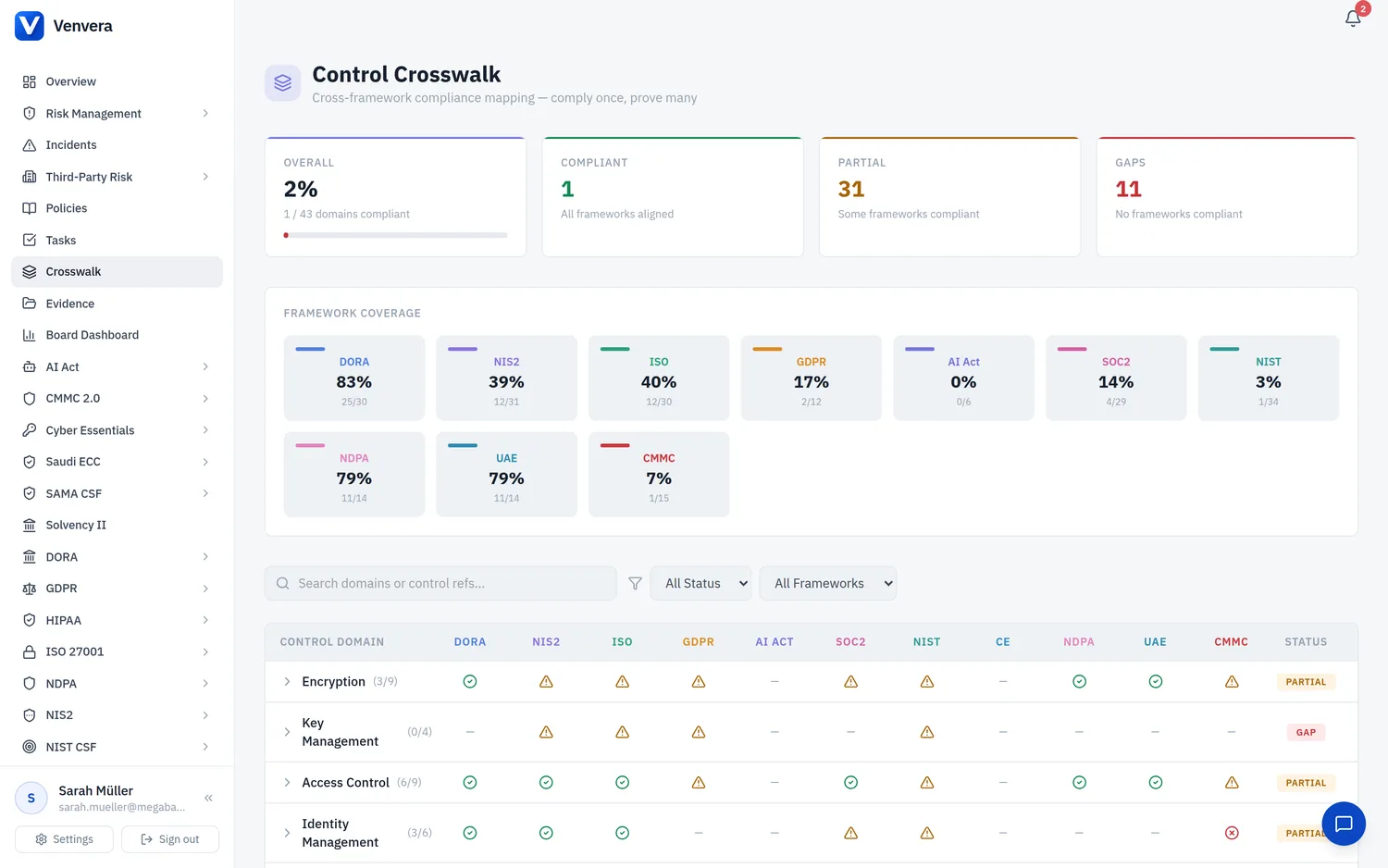
The Control Crosswalk: every framework you run scored against one shared set of control domains, so evidence provided once closes every control it satisfies, in every framework at the same time. (57 seconds)
Venvera automatically propagates compliance status across overlapping frameworks. When you mark a control as implemented in one framework, equivalent controls in your other enabled frameworks are automatically updated. This eliminates duplicate work and ensures consistency across your compliance programme.
How It Works
Many regulatory frameworks share common requirements. For example, both ISO 27001 (A.8.24) and SOC 2 (CC6.1) require encryption controls, and DORA (ICT-10) covers the same area. Venvera maps these overlaps through 43 control mapping groups, each representing a specific compliance area.
When you update a control status:
For example, you mark ISO 27001 control A.8.24 (Encryption) as Implemented.
The system looks up all controls in other enabled frameworks that belong to the same mapping group ("encryption").
SOC 2 CC6.1, NIST CSF PR.DS-01, and any active DORA gap assessment question for ICT-10 are automatically marked as implemented (or score 4 for gap assessments).
Every propagation is logged with the source framework, target framework, old value, new value, and timestamp.
Propagation Rules
| Rule | Description |
|---|---|
| Forward only | Propagation never downgrades a control. If a target control is already marked "Implemented", or explicitly "Not Applicable", a deliberate scoping decision, it is left untouched even if the source changes. |
| Bidirectional | Any framework can be the source or target. Updating SOC 2 can propagate to ISO 27001, and vice versa. |
| Threshold | For control-type frameworks (ISO 27001, SOC 2, NIST CSF, CMMC, Solvency II, Saudi NCA ECC, PCI DSS, HIPAA, Cyber Essentials), only "Implemented" status triggers propagation. For gap assessment frameworks (DORA, NIS2, GDPR, AI Act, NDPA, UAE IA), a score of 3 or higher triggers propagation. |
| Active assessments only | For gap assessment frameworks, propagation only targets assessments with "In Progress" status. Completed assessments are not modified. |
| No loops | If ISO 27001 propagates to SOC 2, that update does not trigger SOC 2 to propagate back to ISO 27001. |
Status Translation
Control-type and gap assessment frameworks use different status systems. Venvera translates between them:
| Source | Target |
|---|---|
| Control "Implemented" | Gap score 4 (Optimised/Managed) |
| Gap score ≥ 3 | Control "Implemented" |
The "Auto-mapped" Badge
Controls and gap assessment responses that were updated by propagation display a small blue "Auto-mapped from [Framework]" badge. This badge tells you:
- The control was set automatically, not manually by a user
- Which source framework triggered the update
- Which mapping group links the two controls
If you manually change a propagated control's status, the badge is automatically removed - your manual assessment takes precedence.
Framework Activation Backfill
When a platform administrator enables a new framework for your organisation, Venvera automatically backfills compliance status from your existing frameworks. For example, if you already have ISO 27001 controls marked as "Implemented" and you enable SOC 2, the equivalent SOC 2 criteria will be pre-populated with "Implemented" status based on your existing ISO 27001 data.
Supported Mapping Groups
The 43 mapping groups cover all major compliance areas:
| Area | Frameworks Covered |
|---|---|
| Encryption & Key Management | ISO 27001, SOC 2, NIST CSF, DORA, NIS2, GDPR |
| Access Control & Identity | ISO 27001, SOC 2, NIST CSF, DORA, NIS2, GDPR |
| Incident Management | ISO 27001, SOC 2, NIST CSF, DORA, NIS2, GDPR |
| Business Continuity | ISO 27001, SOC 2, NIST CSF, DORA, NIS2, GDPR |
| Third-Party & Supply Chain | ISO 27001, SOC 2, NIST CSF, DORA, NIS2, GDPR |
| Risk & Governance | ISO 27001, SOC 2, NIST CSF, DORA, NIS2 |
| Vulnerability & Security Testing | ISO 27001, SOC 2, NIST CSF, DORA, NIS2, GDPR, AI Act |
| AI-Specific Controls | AI Act, NIST CSF, DORA, NIS2, GDPR |
| Network & Configuration | ISO 27001, SOC 2, NIST CSF, DORA, NIS2 |
| Logging & Monitoring | ISO 27001, SOC 2, NIST CSF, DORA, NIS2 |
| Training & Awareness | ISO 27001, SOC 2, NIST CSF, DORA, NIS2 |