
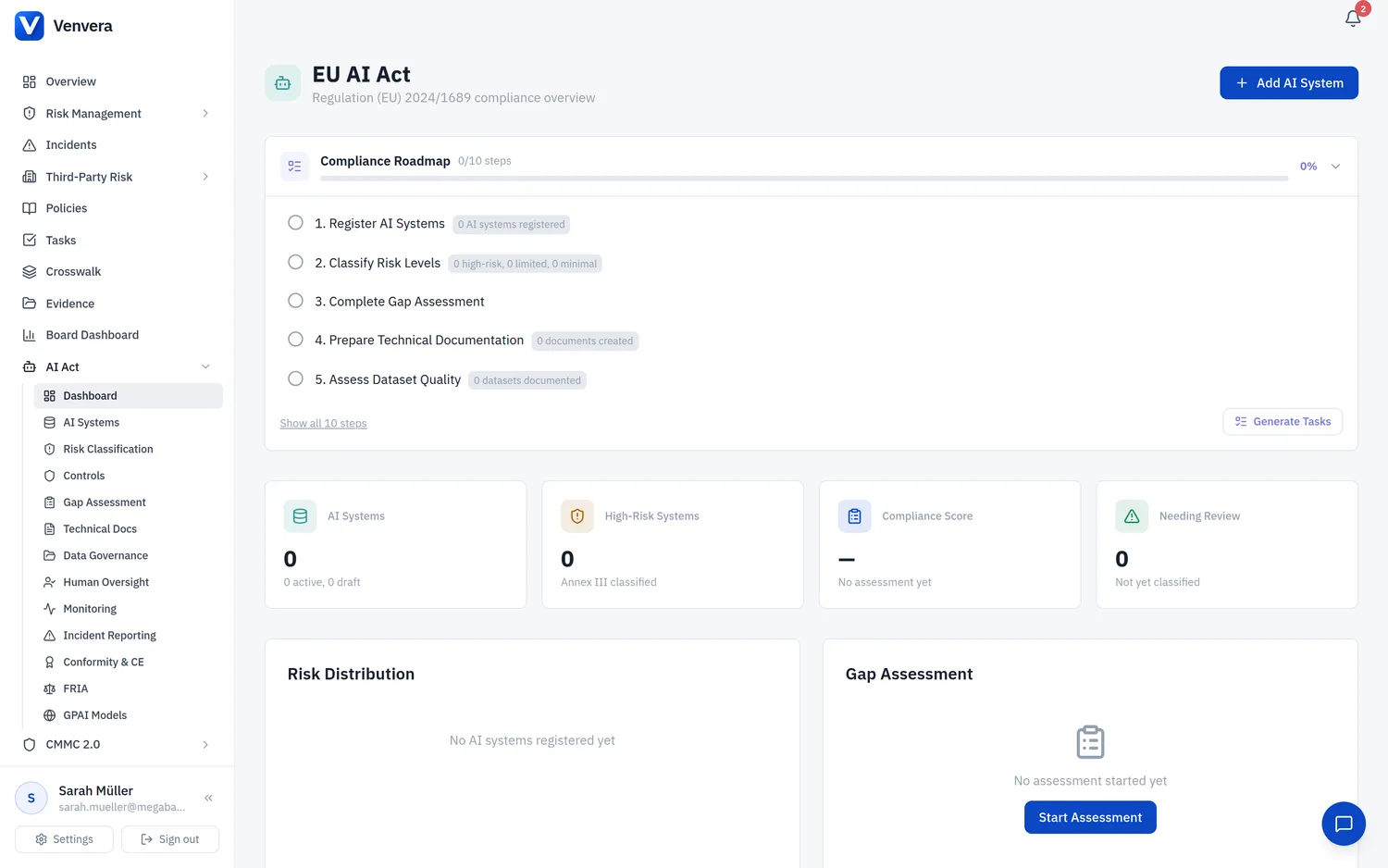
EU AI Act Module - Dashboard Overview
The EU AI Act dashboard is your central command centre for managing compliance with Regulation (EU) 2024/1689 - the European Union Artificial Intelligence Act. It aggregates key performance indicators, risk distributions, and module-level summaries so that compliance officers and management can assess organisational readiness at a glance. This article explains every element of the dashboard, how the metrics are calculated, and how to use the module card grid to navigate into detailed sub-modules.
Accessing the Dashboard
From the main sidebar, expand the EU AI Act section. Click the top-level Dashboard link. If your organisation has not yet created any AI systems, you will see an empty-state prompt inviting you to register your first AI system.
The top strip of the dashboard displays four summary cards. Each card shows a primary number, a secondary label, and a trend indicator (where applicable). These cards update in real time as you add, edit, or retire AI systems and related records.
Below the summary cards, a horizontal stacked-bar chart (or doughnut chart, depending on your theme) visualises the distribution of your AI systems across the four EU AI Act risk tiers. Hover over any segment to see the exact count and percentage.
The lower section of the dashboard presents a grid of module cards. Each card represents a sub-module (Technical Documentation, Datasets, Human Oversight, Incidents, Monitoring, Conformity & CE Marking, and GPAI Models). Click any card to navigate directly to that sub-module's list view.
Top-Level Metric Cards
| Card | Primary Value | Description |
|---|---|---|
| AI Systems | Total count / Active count / Draft count | Shows the total number of AI systems registered in the inventory. The sub-labels break this down into Active (systems currently deployed or in production) and Draft (systems still being documented or not yet deployed). Retired and deprecated systems are excluded from the active count but included in the total. This card gives you an immediate sense of the size of your AI portfolio and how many systems still require documentation before they can be marked active. |
| Risk Distribution | 4-tier breakdown | Displays the count of AI systems in each risk category defined by the EU AI Act: Unacceptable (prohibited under Art. 5 - these should be zero if your organisation is compliant), High Risk (subject to full compliance obligations under Title III), Limited Risk (transparency obligations only), and Minimal Risk (voluntary codes of practice). Each tier is colour-coded: red for unacceptable, orange for high, amber for limited, and green for minimal. If any system is classified as Unacceptable, a warning banner appears at the top of the dashboard urging immediate remediation. |
| Compliance Score | Percentage (0-100%) | Derived from the most recent gap assessment completed for your organisation. The score is calculated as a weighted average across all assessment chapters (Risk Management, Data Governance, Technical Documentation, Record-Keeping, Transparency, Human Oversight, Accuracy/Robustness/Cybersecurity, and Conformity). A score above 80% is shown in green, 50-79% in amber, and below 50% in red. If no gap assessment has been completed, the card displays "N/A" with a prompt to start your first assessment. The score reflects the aggregate maturity of your AI compliance programme and is the single most important KPI on the dashboard. |
| Needing Review | Count of items | Aggregates all records across every sub-module that are flagged for review. This includes AI systems whose review date has passed, technical documents with expired versions, datasets with pending bias assessments, human oversight measures approaching their review interval, monitoring plans with overdue next-review dates, and incidents not yet resolved. The count is a clickable link that opens a filtered view showing all items requiring attention, sorted by urgency. This card is your primary action-driver - aim to keep this number as low as possible. |
Risk Distribution Visualisation
The risk distribution chart provides a visual breakdown of how your AI systems are classified. The EU AI Act defines four risk tiers, and every AI system in your inventory must be assigned to one of them via the Risk Classification Wizard (see the Risk Classification help article for details).
- Unacceptable (Red) - Systems that fall under Art. 5 prohibited practices. These must be decommissioned or fundamentally redesigned. The dashboard will show a critical alert if any system is in this category.
- High Risk (Orange) - Systems listed in Annex III or meeting Art. 6 criteria. These require full compliance with all Title III obligations: risk management, data governance, technical documentation, record-keeping, transparency, human oversight, accuracy/robustness/cybersecurity standards, and conformity assessment.
- Limited Risk (Amber) - Systems with specific transparency obligations (e.g., chatbots, emotion recognition, deepfake generators). Users must be informed they are interacting with an AI system.
- Minimal Risk (Green) - All other AI systems. No mandatory compliance obligations, but voluntary codes of practice are encouraged.
Module Card Grid
The module card grid provides quick-access navigation to every sub-module of the EU AI Act compliance programme. Each card displays a module name, a short description, and a badge count showing the number of records in that module.
| Module Card | Badge Count | Description |
|---|---|---|
| Technical Documentation | Number of documents | Navigate to the Art. 11 / Annex IV technical documentation register. The badge shows the total number of technical documents across all AI systems. Documents with a status of "Draft" are included in the count. |
| Datasets | Number of datasets | Navigate to the Art. 10 data governance module. The badge shows the total number of datasets registered (training, validation, testing, and operational). Datasets with pending bias assessments are highlighted with a secondary warning badge. |
| Human Oversight | Number of measures | Navigate to the Art. 14 human oversight module. The badge count includes all oversight measures, transparency notices, override procedures, monitoring protocols, and bias safeguards. Measures with expired review intervals are flagged. |
| Incidents | Number of incidents | Navigate to the Art. 62 incident reporting module. The badge shows the total number of incidents (all statuses). A secondary red badge appears if any serious incidents have not yet been reported to the relevant authority within the 72-hour deadline. |
| Post-Market Monitoring | Number of monitoring plans | Navigate to the Art. 72 post-market monitoring module. The badge shows the total number of monitoring plans. Plans with overdue review dates are indicated by a warning badge. |
| Conformity & CE Marking | Number of assessments | Navigate to the Art. 43-48 conformity assessment module. The badge shows the total number of conformity assessments. Assessments that have expired (past their Valid Until date) are flagged. |
| GPAI Models | Number of models | Navigate to the General-Purpose AI Models register. The badge shows the total number of GPAI models tracked, including those flagged as posing systemic risk. This module tracks compliance with Title IIIA obligations for GPAI providers. |
Dashboard Refresh & Data Currency
All dashboard metrics are computed server-side when the page loads. If you have made changes in a sub-module and return to the dashboard, the metrics will reflect the latest state. There is no caching delay. For organisations with very large AI portfolios (100+ systems), the dashboard uses optimised aggregate queries to ensure sub-second load times.
Exporting Dashboard Data
You can export the dashboard summary as a PDF report suitable for board-level reporting. Click the Export button in the top-right corner of the dashboard and select PDF Summary. The export includes all metric cards, the risk distribution chart, module counts, and the current compliance score. This is particularly useful for periodic management reviews required by your AI governance framework.