
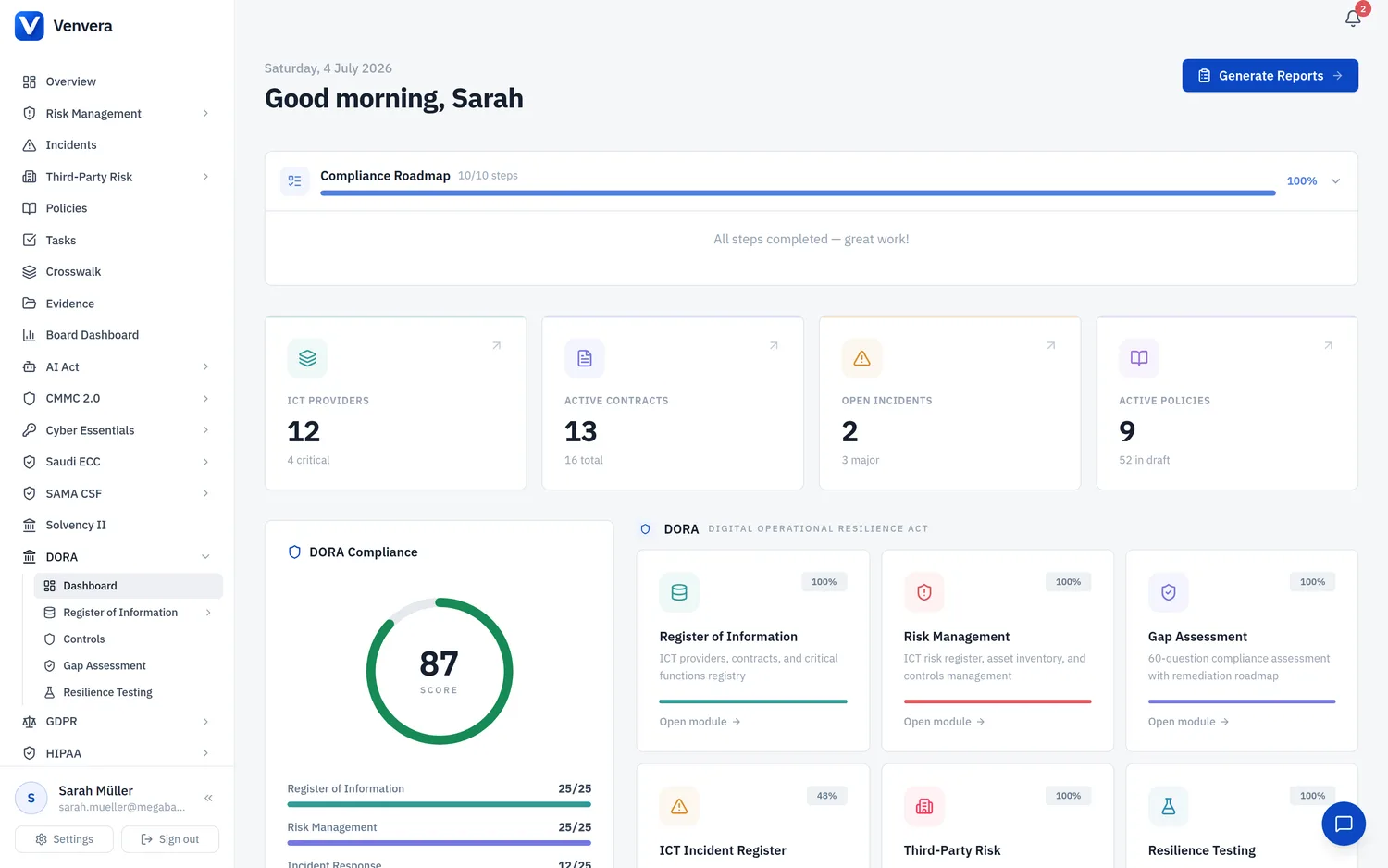
The DORA Dashboard is the central command centre for your organisation's compliance with the Digital Operational Resilience Act (EU Regulation 2022/2554). It aggregates data from every module in the platform into a single view, giving compliance officers, risk managers, and management body members an at-a-glance understanding of where the organisation stands.
Regulatory Context
What is DORA?
The Digital Operational Resilience Act (DORA) is a European Union regulation that establishes a comprehensive framework for ICT risk management in the financial sector. It entered into force on 16 January 2023 and applies from 17 January 2025. DORA applies to virtually all regulated financial entities in the EU, from large banks to small payment institutions and crypto-asset service providers.
The Five Pillars
DORA is structured around five core pillars, each addressed by a dedicated chapter of the regulation:
| Pillar | Chapter | Articles | Focus |
|---|---|---|---|
| ICT Risk Management | Chapter II | Art. 5-14 | Governance, risk framework, identification, protection, detection, response, recovery, and learning |
| ICT Incident Management | Chapter III | Art. 17-23 | Incident detection, classification, reporting timelines (4h/72h/1mo), client notification |
| Digital Operational Resilience Testing | Chapter IV | Art. 24-27 | Testing programme, vulnerability assessments, penetration testing, TLPT, tester requirements |
| Third-Party Risk Management | Chapter V | Art. 28-44 | Provider oversight, contractual provisions, concentration risk, exit strategies, CTPP designation |
| Information Sharing | Chapter VI | Art. 45 | Cyber threat intelligence sharing arrangements among financial entities |
Who is in scope?
Article 2 defines the scope. Entities include: credit institutions, payment and e-money institutions, investment firms, UCITS management companies, AIFMs, insurance and reinsurance undertakings, IORPs, CRAs, securitisation repositories, CSDs, CCPs, trading venues, trade repositories, and crypto-asset service providers. The regulation also applies to ICT third-party service providers designated as critical (CTPPs).
Proportionality principle
DORA recognises that not all entities are equal. Article 4 establishes a proportionality principle: the obligations apply in a manner proportionate to the entity's size, overall risk profile, and the nature, scale, and complexity of its services and activities. Micro-enterprises may benefit from simplified requirements in certain areas.
Compliance Ring
The most prominent element of the dashboard is the Compliance Ring - an animated circular gauge that displays your overall DORA compliance score as a percentage from 0 to 100.
How the score is calculated
The compliance score is derived from a combination of data completeness across your Register of Information, the results of your Gap Assessment, and the state of your risk management, incident, and testing modules. It provides a holistic measure of readiness.
Colour thresholds
| Score Range | Colour | Interpretation |
|---|---|---|
| 70% and above | Green | Compliant - the organisation meets the core DORA requirements |
| 40% to 69% | Amber | Partial compliance - significant work remains in some pillars |
| Below 40% | Red | Significant gaps - urgent attention needed across multiple areas |
The ring animates on page load, counting up from zero to the current score with a smooth easing transition. The number in the centre updates in real time as the animation progresses.
Pillar Progress Bars
Below the compliance ring, four progress bars break down the score by operational pillar:
| Pillar Bar | Max Score | Colour | What Feeds In |
|---|---|---|---|
| Register of Information | 25 | Teal (#14b8a6) | Completeness of providers, contracts, functions, entities, and sub-outsourcing data |
| Risk Management | 25 | Indigo (#6366f1) | ICT risk register, risk assessments, gap assessment scores for ICT Risk Management pillar |
| Incident Response | 25 | Amber (#f59e0b) | Incident register completeness, response procedures, gap assessment scores for Incident Management pillar |
| Third-Party Risk | 25 | Rose (#f43f5e) | Provider oversight, contractual compliance, concentration risk posture, gap assessment scores for TPRM pillar |
Each bar displays the current score out of 25, with a colour-coded fill that grows from left to right. The bars animate sequentially with staggered delays, creating a cascading visual effect.
Quick Stat Cards
A row of four clickable stat cards provides instant visibility into the key data dimensions of your DORA programme. Each card links to the relevant module for deeper exploration.
| Card | Primary Value | Secondary Detail | Links To |
|---|---|---|---|
| ICT Providers | Total provider count | Number classified as critical | Providers page in RoI |
| Active Contracts | Number of active contracts | Contracts expiring soon (or total count) | Contracts page in RoI |
| Open Incidents | Number of open incidents | Number classified as major | Incident Register |
| Active Policies | Number of active policies | Number currently in draft | Policy Library |
Numbers animate on page load with a counting effect. The cards hover upward slightly on mouse-over and include a subtle directional arrow icon.
Module Cards
The dashboard displays a grid of module cards, split into two groups: DORA modules and Cross-Framework modules.
DORA Modules
| Module | Description | Links To |
|---|---|---|
| Register of Information | ICT providers, contracts, and critical functions registry | /dora/roi |
| Risk Management | ICT risk register, asset inventory, and controls management | /risk-management |
| Gap Assessment | 69-question compliance assessment with remediation roadmap | /dora/gap-assessment |
| ICT Incident Register | Incident tracking with ITS regulatory timelines | /incidents |
| Third-Party Risk | CTPP classification and concentration risk analysis | /tprm |
| Resilience Testing | Testing programme, TLPT, vulnerability management | /dora/resilience-testing |
Cross-Framework Modules
| Module | Description | Links To |
|---|---|---|
| Policy Library | Compliance policy templates and lifecycle management across frameworks | /policies |
Each module card displays:
- A colour-coded icon representing the module's DORA pillar
- A completion percentage badge calculated from the corresponding pillar score (pillarScore / 25 x 100)
- A title and short description
- A progress bar that visually represents the completion percentage
- An "Open module" link that becomes highlighted on hover
Quick Insights
The bottom row of the dashboard contains three insight panels:
Upcoming Renewals
Shows the number of contracts expiring within 90 days. If contracts are approaching expiration, this card displays the count prominently with a link to the Contracts page. If no contracts are expiring soon, it shows a reassuring "No contracts expiring soon" message.
Regulatory Updates
Displays the count of unacknowledged regulatory updates. Staying current with ESA guidance, RTS/ITS amendments, and NCA communications is essential for ongoing compliance. Clicking the link navigates to the Regulatory Updates module.
Data Completeness
A checklist-style panel that tracks whether you have entered at least one record in each key data category:
- Providers - at least one ICT provider recorded
- Contracts - at least one contractual arrangement
- Functions - at least one business function
- ICT Risks - at least one risk assessment
- Resilience Tests - at least one test recorded
Each item shows a green dot and count when the target is met, or a grey dot when data is missing. This serves as a quick onboarding checklist for new users.
Action Buttons
In the top-right corner of the dashboard header, two action buttons provide quick access to key workflows:
| Button | Action | Description |
|---|---|---|
| Generate Reports | Navigates to /reports | Access the Board Report generator and other compliance reports |
| xBRL-CSV Export | Navigates to /dora/roi/export | Generate the regulatory filing package for NCA submission |
Tips for Using the Dashboard
Understanding the Greeting and Date Header
At the top of the dashboard, a personalised greeting welcomes you by first name with a time-appropriate message (Good morning, Good afternoon, or Good evening). The current date is displayed in full format (e.g., "Saturday, 22 February 2026"). This small detail helps orient users who access the dashboard at different times of day and provides a clear timestamp for any screenshots or reports generated from the view.
How Scores Improve Over Time
The compliance score is not static. As you build out your DORA programme, every action contributes to a higher score:
- Adding providers and contracts improves the Register of Information pillar score
- Completing gap assessments directly feeds the pillar progress bars with weighted maturity scores
- Recording incidents and establishing response procedures strengthens the Incident Response pillar
- Performing resilience tests and documenting findings builds the Resilience Testing dimension
- Establishing policies and keeping them in active status contributes to policy compliance metrics
The module card completion percentages update in real time, providing a visual roadmap of which areas need the most attention. Modules with low completion percentages are the highest-leverage areas for improvement.
Navigation and Layout
The dashboard uses a responsive layout that adapts to different screen sizes. On desktop, stat cards display in a 4-column grid, module cards in a 3-column grid, and insight panels in a 3-column row. On mobile, these collapse to 2-column and single-column layouts respectively. All interactive elements are touch-friendly, and the animated number counters work on all devices.
From the dashboard, you can reach every DORA module in a single click through the module cards. The stat cards also serve as navigation links - clicking any stat card takes you directly to the relevant data page. This hub-and-spoke design means the dashboard is always your starting point and you never need more than two clicks to reach any feature.