
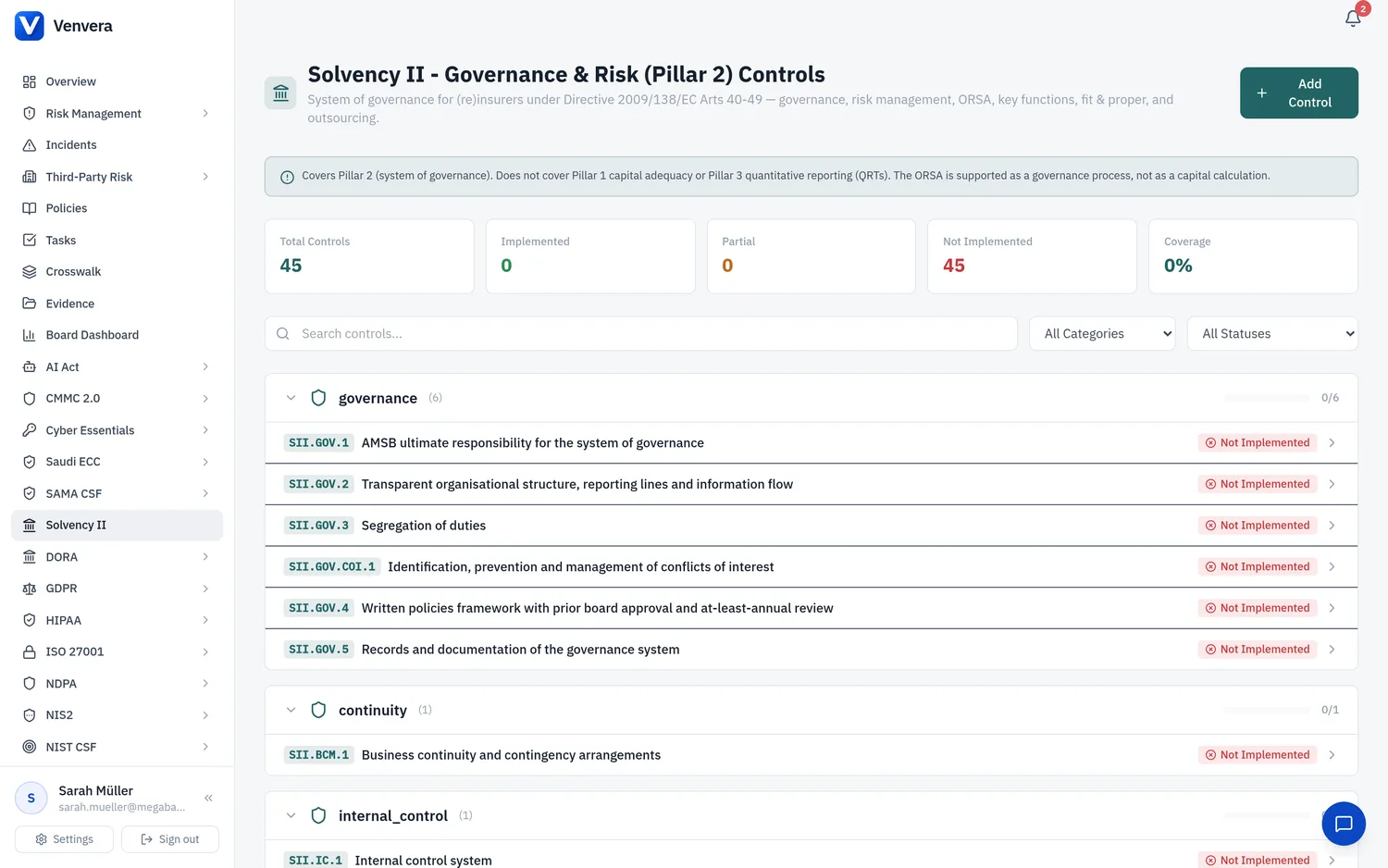
The Solvency II (Pillar 2) framework in Venvera is the governance and risk system-of-record for EU insurance and reinsurance undertakings. It manages the System of Governance requirements set out in Articles 40 to 49 of the Solvency II Directive (2009/138/EC), as detailed by Delegated Regulation (EU) 2015/35 and the EIOPA Guidelines on System of Governance. It is built for the Pillar 2 owner - the CRO, Head of Risk, Compliance function, or a key-function holder - to evidence sound governance to EIOPA and the national supervisor.
Regulatory Context
What is Solvency II?
Solvency II is the EU prudential regime for (re)insurers. It is organised into three pillars: Pillar 1 (quantitative capital requirements - SCR, MCR, technical provisions), Pillar 2 (qualitative governance and risk requirements - the System of Governance and the ORSA), and Pillar 3 (supervisory reporting and public disclosure - the QRTs and the SFCR/RSR). Supervision is shared between EIOPA and national competent authorities.
What Venvera covers: Pillar 2 only
Venvera implements the System of Governance under Articles 40 to 49. This includes general governance and overall responsibility of the administrative, management or supervisory body (AMSB), the written policy framework, the risk management system, the ORSA as a governance process, the internal control and compliance function, the internal audit function, the actuarial function, fit and proper requirements, remuneration, outsourcing, and business continuity.
Enabling the Framework
An Admin user navigates to Settings → Company Profile → Enabled Frameworks. Only Admin users can change which frameworks are active. If you are an Editor or Viewer, ask your administrator to enable it.
Tick the Solvency II (Pillar 2) checkbox and save. The framework then appears in the left sidebar with its dashboard, control catalogue, and ORSA workspace. Solvency II is available from around EUR 399 per month depending on your plan.
In the control catalogue, assign an owner to each control. For the four key functions (risk management, compliance, internal audit, actuarial), assign the responsible key-function holder so that responsibility and reporting lines are documented from day one.
The Control Catalogue
Venvera's Solvency II (Pillar 2) catalogue contains 45 controls, grouped by the areas of the System of Governance. Each control maps to the underlying Directive article and the relevant EIOPA guideline.
| Control Area | Directive Reference | What it covers |
|---|---|---|
| General Governance and the AMSB | Art. 40, 41 | Overall responsibility of the board, organisational structure, clear reporting lines, segregation of duties, protection of records, and the written policy framework reviewed at least annually |
| Risk Management System | Art. 44 | Strategies, processes and reporting procedures to identify, measure, monitor, manage and report risks, on an individual and aggregated basis |
| ORSA (governance process) | Art. 45 | ORSA policy, board ownership and approval, documentation of each assessment, and the regular and event-driven review cadence |
| Internal Control and Compliance Function | Art. 46 | Internal control framework, compliance policy, monitoring of legal and regulatory change, and compliance reporting to the AMSB |
| Internal Audit Function | Art. 47 | Independent and objective internal audit function, audit plan, and reporting of findings to the board |
| Actuarial Function | Art. 48 | Coordination of technical provisions governance, opinion on underwriting and reinsurance policy, and the actuarial function report to the AMSB |
| Fit and Proper | Art. 42 | Fitness and propriety assessment of board members and key-function holders, with documented evidence and reassessment |
| Remuneration | Directive Art. 41, Del. Reg. Art. 275 | Remuneration policy aligned to sound risk management and avoidance of conflicts of interest |
| Outsourcing | Art. 49 | Outsourcing policy, notification of critical or important functions, contractual provisions, and ongoing monitoring of service providers |
| Business Continuity | Art. 41(4) | Business continuity and contingency arrangements to safeguard continuity and regularity of activities |
The ORSA workspace
The ORSA is managed as a governance process. The workspace holds the ORSA policy, records the AMSB approval, stores each ORSA report as documented evidence, and tracks the review schedule so that both the regular annual assessment and any event-driven reassessment are captured.
The four key functions
Solvency II requires four key functions: risk management (Art. 44), compliance (Art. 46), internal audit (Art. 47), and actuarial (Art. 48). Each function has dedicated controls for its mandate, independence, reporting line to the AMSB, and periodic reporting. Assign a key-function holder to each so that fit and proper records and reporting evidence stay linked to the responsible person.
Crosswalk: overlay versus native
Venvera's differentiator is the cross-framework crosswalk - evidence once, compliant everywhere. For Solvency II (Pillar 2), controls fall into two clearly separated categories.
Overlay controls: evidence once from DORA, NIS2, or ISO 27001
Several Pillar 2 governance controls overlap heavily with the ICT and organisational governance already required by DORA, NIS2, and ISO 27001. Where the underlying obligation is genuinely equivalent, evidencing the DORA/ISO control auto-satisfies the matching Solvency II governance control. You do not re-upload the same evidence.
| Solvency II governance control | Auto-satisfied by evidence from |
|---|---|
| Organisational structure and clear reporting lines (Art. 41) | DORA / ISO 27001 governance and organisational controls |
| Segregation of duties (Art. 41) | DORA / ISO 27001 access and segregation controls |
| Protection of records (Art. 41) | ISO 27001 records protection / DORA data controls |
| ICT and security elements of outsourcing - contractual provisions and monitoring (Art. 49) | DORA third-party risk contractual and monitoring controls |
Native controls: evidenced directly, never auto-satisfied
Insurance-specific controls are native. They are evidenced directly against Solvency II and are never satisfied from generic DORA or ISO evidence. This is deliberate: a supervisor would reject governance that claims coverage it does not have.
- ORSA process (Art. 45) - policy, board approval, documentation, review cadence
- The four key functions, including the actuarial function (Art. 48)
- Fit and proper (Art. 42) for board and key-function holders
- Remuneration policy aligned to sound risk management
- Non-ICT operational risk and insurance-specific risk management
Providing Evidence
Evidence works the same way as every other framework in Venvera, from a single control-centred workflow.
In the Solvency II (Pillar 2) catalogue, open the control you want to evidence. Each control shows its Directive article, its current status, its owner, and any existing evidence.
Use Add Evidence to attach the relevant artefact - a policy document, board or committee minutes, the ORSA report, a fit and proper assessment, an internal audit report, an outsourcing register entry, or a contract. Add a short note explaining how the artefact satisfies the requirement.
For an overlay control, Venvera surfaces the linked DORA, NIS2, or ISO 27001 evidence and marks the control as satisfied. Confirm the mapping rather than re-uploading. Native controls do not offer this and must be evidenced directly.
Mark the control as implemented, partially implemented, or not implemented, and set a review date. The dashboard aggregates these into your System of Governance coverage so you can see, per area, where evidence is complete and where gaps remain.